Windows 7 (laptop) HDMI picture with border?
Hello when I connect my laptop via HDMI to the monitor I can select 1080p but there's still a thick border. I hope someone can help me.
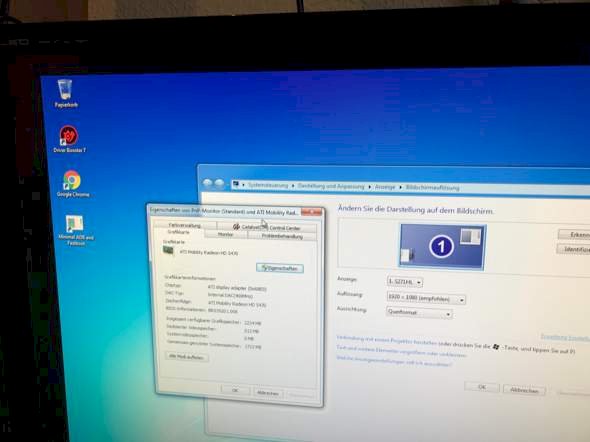
Depends on whether the monitor has 16: 9 or 4: 3 should it have 16: 9, then I do not know where the problem is
Ahja thanks for a WIN 10 update (how should the jtz help?)
Then the screen is not a 16: 9.
But it is… With my desktop pc everything works…
Then try Windoofs 10…
Yes 16: 9 is 1080p with 60hz
I don't see your edge now but maybe you have a 1200 and not a 1080?
Why i need for a special project win 7 and win 10 works on that without problems but what does that bring me…
No since 1080p is "recommended" and 1200p is not available (to choose from)
Latest drivers installed?
Vm not there? And the driver was brought up to date with driver booster 7
Driver Booster 2…
Just take the right ones
Yes it is acer and all drivers have been downloaded / installed
2?
Sry 7.
Where's the edge everywhere? Only on the side or all the way around?
"all over"
And 7 did I use?
Hmm, at Nvidia there's a function with which you can create completely new resolutions. So there are edges all around. Find the times in the Radeon system settings.
Otherwise: Does the screen have a click menu? Maybe you can set other resolutions there, but I can't imagine that.
No, do not use an automatic driver update but download everything yourself. Degrees at W7 not.
Nine on the screen itself you can't set anything and amd I do not find such a setting option.
I'll have a look
Ok… Because without a driver booster I could only set 1100x850 or so… And yes, I already installed the amd drivers
Ok so the problem was solved and it was quite understated activated… Jtz but I have the problem (even before) that there's no sound via hdmi, although I have given it during the installation
I really can't have a say in that. No idea. I never used it.
Ok…


