Bitlock recoverykey?
Is there a way to get my Bitlock Recoverykey?
I have not saved it using my Microsoft account, nor did I initially save it on an external storage medium.
After some parts were no longer functional (CPU etc.) and have now been replaced, the system requires the following key, see below.
Before I sent in the laptop, I tried to secure the hard drive and was asked to enter a 48-digit recovery key.
How can I proceed now? The dates are important to me. Backup via cloud etc. Is not available.
Are there realistic options? Hack, extra programs or any other way to get the data back with my old password?
I'm grateful for any information!
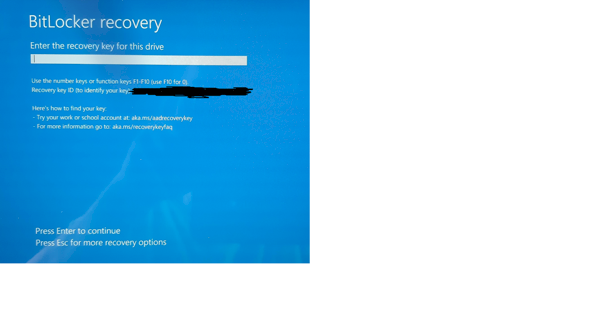
Did you ever follow the links? Press ESC for more recovery options?
When I press ESC, he wants the recovery key. The links don't work directly, but I don't have a Microsoft account with a key, so unfortunately it doesn't work either.
Then, I would say, your problem is solved.
Apparently you have now found out the reason why BitLocker so forcefully tells you to restore the recovery key somewhere else on another device.
Hy,
When activating the Bitlocker, as soon as you want to activate it in Windows, Windows capitalizes you should save the key externally.
Where did you save your recovery key?
if you write now directly on your computer in a local file, you were unlucky.
You won't crack Bitlocker encryption and without your pin or the recovery key you can reformat your hard drive and that's it.
The problem is, I ordered the laptop with Windows preinstalled… I was not aware that it was activated. A backup was therefore not made.
Does that mean hacking is pointless? There are supposed to be programs for it.
You can hack 256 bit encryption for a long time, it would be new to me that Bitlocker is sold on new devices, should that actually be you will definitely have received a key.
I have to disappoint you wist without the recovery key or the pin you can't do anything else.
Do you remember your normal pin? Which you always entered to decrypt when booting?
I bought the laptop in 2018. My work laptop only loaded updates regularly, but the key should have been preinstalled from the start.
I only know my password, which I always entered when I started the computer, but how do I get a display where I can enter this password, is there this possibility?
I got the PC - now unfortunately - pre-installed. I have never heard of a BitLocker key and would have taken this into account if I had installed the PC myself. Unfortunately you are always confronted with "new" things.
Now it is not sure if this is still possible, but you have two options.
you start your laptop in safe mode, if you are in Windows you can change your key or pin or search for the local file (I'm not sure if this is still possible)
You can remove the hard drive and connect it externally to another PC, as soon as you have connected it, Windows prompts you to enter the pin because it is encrypted. If that works, you can change the pin there or completely disable Bitlocker.
These are both methods that remain open to you but as I said I'm not sure if this is still possible. There are 2 methods of Bitlocker encryption, first the variant with which you encrypt stand PCs etc. And once a Bitlocker to go variant in which you encrypt the data carriers if you use them more often on other devices.
It's best to try the two methods, I wish you luck that one of them works.
If you are wondering how to start Safe Mode just google your laptop and Safe Mode.
Yes, but then the guy who installed the part knows the key?
I don't think so, but I've already emailed the store. I probably would have had to save it myself, but I couldn't do it without knowledge.
Thank you very much, I'll try Safe Mode in the hope that it works.
I have already tried to transfer the hard drive externally via a "USB device" to the other PC. Unfortunately, he immediately asked for the Bitlockerkey, possibly it recognized the "external access".
Well, the recovery key is generated when you encrypt the hard drive (say, when you set the password). So, either the store gave you your password or you just sold it yourself… When you did the encryption.


