GPU is not running?
I have an Acer Aspire 7750G laptop and I noticed that I do not get displayed in the Task Manager GPU or even if I activate the display, as is permanently a load of 0%. Does that mean that is not running or is defective if necessary?
The laptop is older and had Win7 at first. Have been running for a long time without problems on win10 but have noticed a worsening of the performance. So could possibly be due to the improvement on win10?
If necessary can also mention CPU and the graphics card / chip
For a more precise answer you would have to first name us the full model name of your notebook.
Basically, however, a mobile Intel Core i (x) - 2xxx with integrated Intel HD 2xxx - IGP and a dedicated Radeon HD 6xxxM seems to be combined in this model series.
It is questionable at this point whether you have searched and installed the correct Windows 10 drivers for the operation under Windows 10 for the complete AMD motherboard chipset and the AMD graphics solution.
Have you checked the device manager, if there are some unknown components or components with exclamation marks listed?
Thank you first for your answer! I add a screenshot of my device manager as a new answer.
Here is a picture of my device man
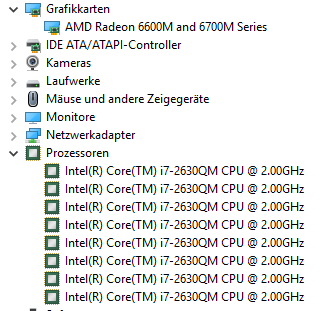
The 8 entries to the CPU are absolutely ok. One entry per logical thread.
Your AMD graphics solution also seems to be installed correctly, and to be functional, otherwise GM would list an Intel HD 2xxx.
Download the little tool GPU-z and run it. This little tool should give you exact information about technical details of your (active) graphics card.
Of course, in desktop mode (2D mode) such a graphics solution is not significantly affected.
If you have correctly installed the AMD Catalyst driver software, you would normally need to have the ATI / AMD control software (CCC) available to configure the graphics settings.
Are there general problems with the graphics card, if you want to start a 3D application / game?


