How do I load a game from Steam onto my SD card?
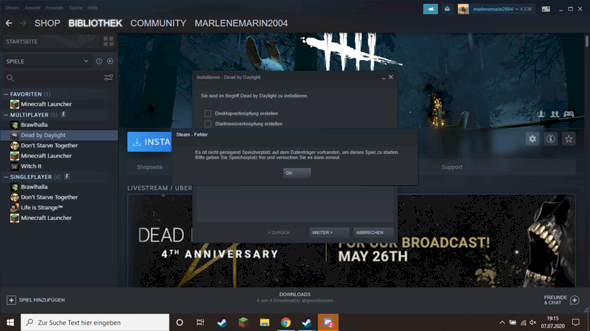
Hello, I bought an SD card today because I didn't have enough space to download Dead By Daylight. When I tried it again (with an SD card), it still didn't work because the laptop space is insufficient. Is there a way to work around this problem?
Thank you in advance for the answers.
PS: I don't know if that's important, but I have Windows 10.
You would have to change the installation folder and download folder on Steam, but if I'm not mistaken, the games and downloads that have already been installed will also be moved there
And expand the memory with an SD card. I don't know if that's a good idea. I can imagine that this is not really fun while running…
Thank you very much;)
I would recommend that you get an external hard drive and the games would run faster.
Then you should have a look at the file path.
What is a file path? Sorry, I don't know anything about anything at all… But thanks for the hard drive tip.
This is the way from the hard disk to the target folder e.g. If you click on my computer and then on C: / several medals come on steam
dan should be in a bar at the top
"C: / Steam /" stand
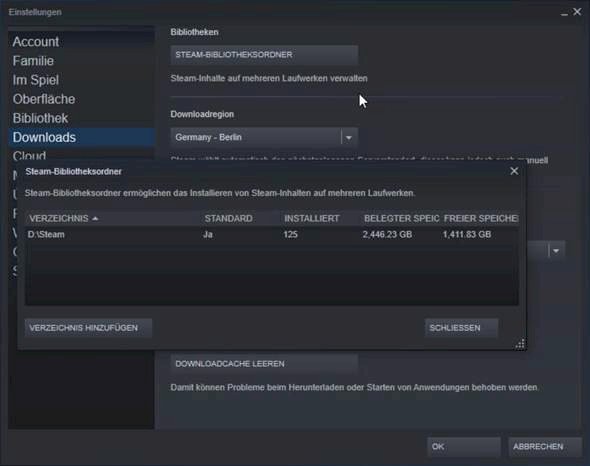
Ideally, you go to the Settings in Downloads, and then create another library folder at the top, on which you can then install games.
Ah, thanks!
But is it also possible to move the contents of one directory to another?
You could simply move the Steam folder and then reinstall Steam from this folder so that the shortcuts all lead to the SD card.
But you have to make sure that the SD card always has the same drive letter.
BUT, such an SD card can't be a permanent solution. Such map is very slow.


