Do you need help with your laptop?
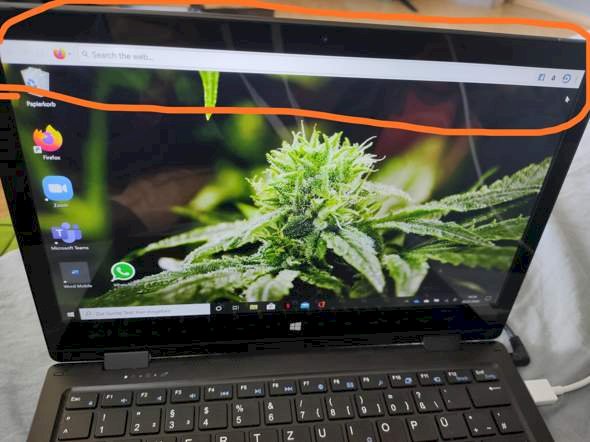
Hi, since yesterday there's a bar up there but I have no idea how it goes away. And it is extremely annoying. Does jmd know how it goes away?
Since you have probably caught some toolbar or something. Let the ADW Cleaner run over it…
Looks to me like a classic Mozilla Firefox search box,
Have you tried right-clicking?
Otherwise Control Panel - Programs / Programs Uninstall and see if you have what is in the list that is similar to Mozilla (search bar)
Otherwise I can imagine that it could be an add-on in Mozilla Firefox.
Isn't that a kind of taskbar? Can't you pull it down? Look in the settings for the taskbar. Click on it with the cursor and click the right mouse button.
Or a browser bar from Firefox
Enter task manager at the bottom of the bar → open task manager → search for firefox programs → right click → end task
What happens when you kick the 3 dots on the far right of the browser bar? Usually a submenu opens with further options. Perhaps there's also "Hide" or "Exit" among them.
You have these 3 points for example in the top right of your question. If you click on it, a menu opens with 7 options for further processing your question. The same applies to the answers, they also have these 3 points.


