Windows 10 crashes?
I have a Gigabyte P27 notebook. I installed a new SSD 1 TB from Samsung and wants to get Windows 10 up and running.
I installed it and then imported all the updates. Then I started installing the standard software (browser, Office 2013, Norton)
Now it actually crashes a lot. Each time with a different message. Sometimes it is the working memory, sometimes some memory sometimes kernel.
If I want to google and analyze the messages, he always says no error found.
Have had the NB for 5 years and it has been running flawlessly with W7.
Does anyone have a tip for me?
Make Windows again.
Custom install delete all partitions.
The fans are actually running. 🤔
If it crashes, you should start again immediately, otherwise it builds on the first error and creates new ones and you no longer know where the first error came from.
If you want to reinstall Win10:
did you install Win10 from a USB stick on which you previously saved an installation file or used the "https://www.microsoft.com/de-de/software-download/windows10" for this?
With the "MCT" you can start the tool while a USB stick is best plugged into the "NB" that has at least 8 GB of memory but a bit of buffer over it would not be a bad idea and then go through the installation ( choose the top one like the attached picture)
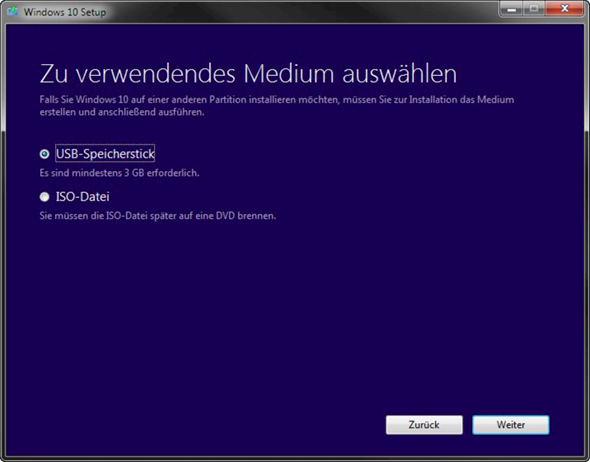
until he asks you on which removable medium so in the case of the USB stick you want to put the installation files on it (but you can also use something other than a USB stick, your computer must be able to recognize the medium, it has to hold at least 8 GB I have memory and would still recommend a USB stick for this, although I used an external drive (with 500 GB memory lol enough buffer but really only needs at least 8 GB free is also explained on the first page in the first linked link) via which I then installed Win10 on the new disk with a data cable (for me I first tried it with an SD card but my laptop does not recognize it).
[! So it deletes this medium but automatically reformats it so use a medium with nothing on it!])
If you didn't do that with the installation before, I would recommend doing it that way for me last week.
And before you start installing Win10 with the USB stick, it would be good if you set the boot sequence in your BIOS settings so that everything "USB" has in the name or at least the USB type it has has recognized from the inserted USB stick in the order you should be told in the BIOS how to navigate. (You get into the BIOS at your "NB" by pressing "F2" at the start when the logo comes [or just at start.] https://www.manualslib.com/manual/595300/Gigabyte-P27.html?page=7 is in the manual under "System Setup".
Greetings and if there are any questions like to go ^^
I've already installed 3 times, yes, the fans are running, also thought that the CPU or GPU are getting too hot and then I loaded a tool, everything ok so far.


