Can you also install Ubuntu 64 bit on Windows 32 bit?
Is that possible or what do I have to do?
I have a second laptop and want to try out linux on it, it works with 32 to 64 bit.
This works if the processor is 64bit capable.
P.S. I wouldn't recommend Ubuntu, but Linux Mint. Linux Mint is based on Ubuntu, but there are also package sources for proprietary drivers. This gives you better hardware support. Otherwise Linux Mint is 100% compatible with Ubuntu.
I recommend Linux Mint Xfce: http://mirrors.evowise.com/linuxmint/stable/20/linuxmint-20-xfce-64bit.iso After the download, flash the ISO with Rufus https://rufus.ie/ onto an empty formatted USB stick and then boot the stick. Just follow the instructions of the wizard. He immediately sets up the WLAN and offers the option of deleting everything. Simply select the option "Erase hard drive and install Linux Mint". I also recommend selecting the "Third-party software" option. I recommend a full installation as the type of installation.
This is what the desktop looks like:
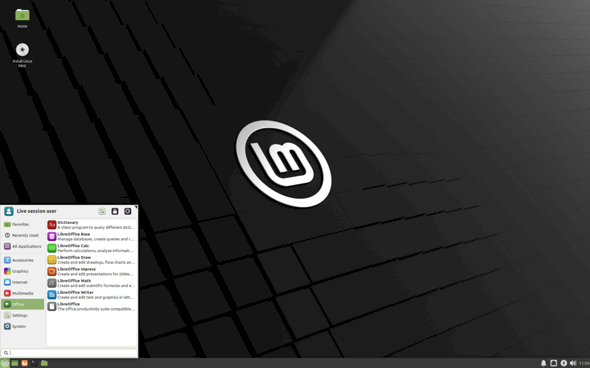
It looks modern and has a start menu. As you can see it is divided into categories. That makes the whole thing clear. The taskbar with the clock, volume, network / WLAN also looks familiar. If updates appear, an icon with the message "Updates available" appears next to the clock. Then you can easily install it. The whole thing can also be completely automated so that it runs in the background.
If you e.g. When an external hard drive or stick is plugged in, an icon appears on the desktop and can then be accessed.
Linux Mint Xfce goes off like a rocket. In comparison, Windows is a lame duck.
If you have a 64 bit processor, you can of course also use Linux in its 64 bit version on the PC.
But what I think has not been written so far is that you have to be careful to install the second operating system in the same mode.
If Windows has already been installed in legacy mode, i.e. Not in UEFI mode, then you also have to install Linux in legacy mode, i.e. Not in UEFI mode, because otherwise if all systems are installed, not both systems in the boot environment, in the pit, are shown united.
Then it means an unknown system. So be careful in which mode you boot the installation medium to install the operating system.
Therefore, install both systems either in UEFI mode or both systems in legacy mode, then it works too, afterwards to have both operating systems in the list for booting when you turn on the PC.
It is best to install a second operating system on a second disk.


