Easy box wlan strikes?
My Wi-Fi seems to be spinning. Sometimes I have an excellent reception, then again none at all. This goes so far that I need a LAN cable on the laptop, although this is right next to the router. (My apartment is also very small).
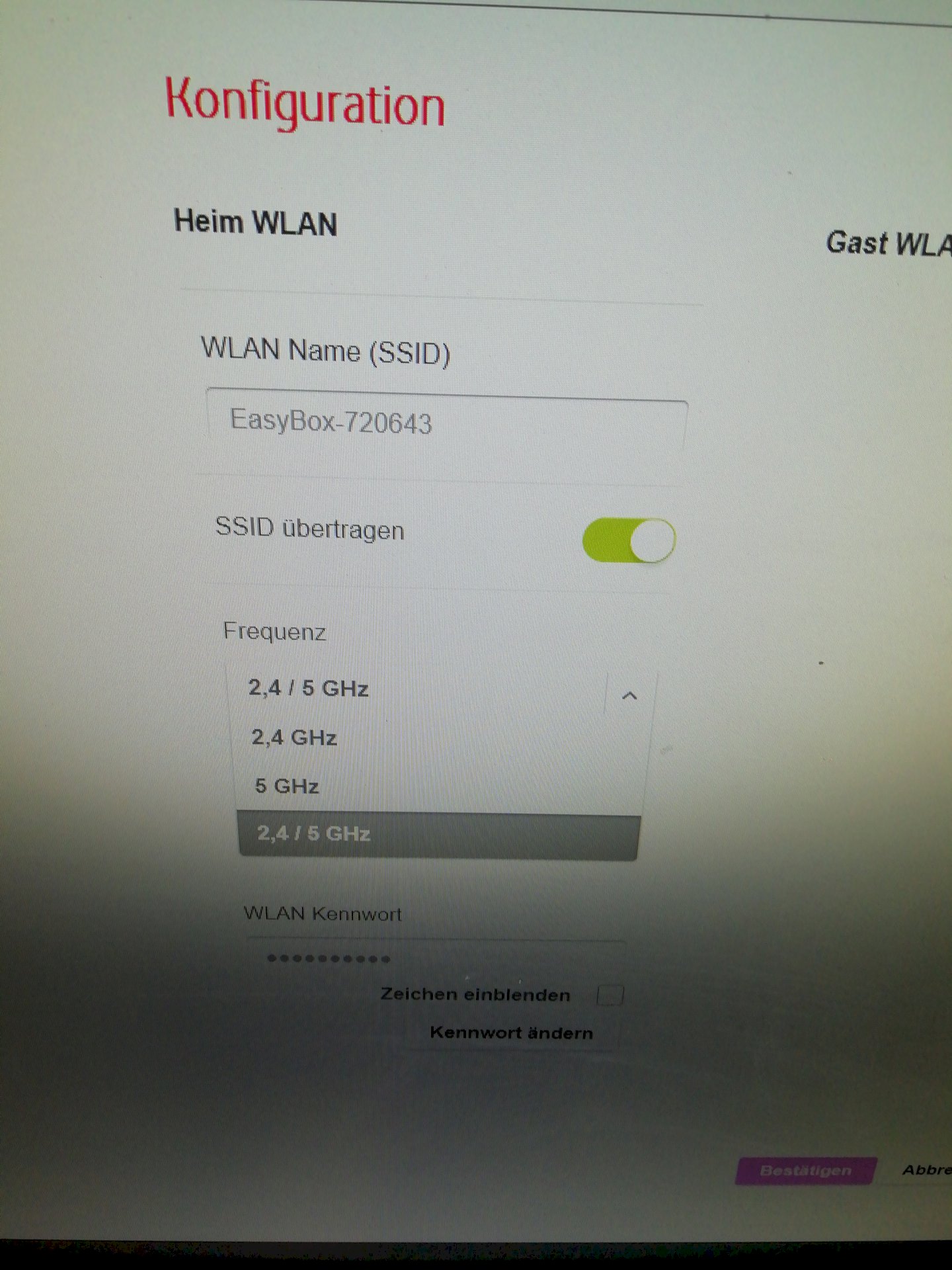
I have the possibilities of the frequencies 2,4, 5,0 and 2,4 and 5,0.
So far I have always been with the latter.
Today I tried the two other frequencies, just as I read that 5.0 seems to be the least used.
On 2.4 and 5.0 but nothing seems to be running.
Since I do not know that, I called Vodafone. The coworker meant only that the Wlan a free "addition" to my Internet would be flat and that one could do nothing, as long as my connection is stable over LAN.
Can someone else help me and say what options I have left?
Very dear thanks!
There are only 2.4 and 5.0 GHz and what else do you actually not write:-) or you have prescribed yourself (… The possibilities of the frequencies 2,4, 5,0 and 2,4 and 5,0)
the thing with the free extra (WLAN) should probably be a joke of the Vodafone employee.
Which router do you use? With the answer to this question, we get a first part of the problem solution. In the router you should change the radio channel, so instead of 11 e.g. The 4 - change to one of your neighbors little used (with) frequency band.
Which operating system do you use? There you can check the properties of your LAN (WLAN) adapter and make changes.
Are you using the WLAN module installed in the laptop or are you inserting a WLAN (USB) stick?
You should transfer the matter to a knowledgeable friend / colleague, etc., because without any expertise we will not be able to do this - in the permanent dialogue with pictures and technical terms etc.
But let's try at least 2 further steps. I'm waiting…
Thank you for your response!
In fact, I have the three options of 2.4 GHz 5.0 GHz and 2.4 + 5.0 GHz.
Yes, the employee was not very friendly either.
I have the easy box 720643 and use Windows 10.
I just put a picture of the possible frequencies in the comments.
Oh, sorry, I do not use a USB stick
OK, you have the option of connecting via optional (either / or) 2.4 or 5 GHz; Now the question is whether the WLAN module in the laptop can also be 5 GHz. If not, select the 2.4 GHz option in the router. This is (still) the most used radio band and therefore often overloaded and therefore slow. Look in the settings of the channel and change it to (advised by me) 4 instead of 11 or 1 (also advised:-)
If the laptop is capable of 5 GHz, change to channel 36 or higher, depending on what is possible in the selection.
In the Windows device manager, the channel mode should be consistent under Wireless LAN Card in the properties. If the laptop can be 5 GHz, set it to 2.4 / 5.0 GHz, then it works well with cell phones and other devices that can only make 2.4. I send pictures in new answer.
First of all, your model description of the EasyBox is not 720 …, I guess it is an EasyBox 804 (the model number is probably on the bottom of the box… Sticker).
I hate to say it, it could be that your EasyBox is simply broken.
Because she had worked, but suddenly she has dropouts.
It is in my view not a configuration problem, but simply a defect.
Call Vodafone and have the EasyBox replaced, as a working Wi-Fi network is part of your contract, so Vodafone needs to provide a working device, including Wi-Fi.
The argument "Wi-Fi is free of charge" does not pull, because that is in my view "deception" on conclusion of the contract! If you had completed the contract, if it had no Wi-Fi, I believe no, so insist on an exchange.
A comparison: If I rent a car with air conditioning and get a car with broken air conditioning, and you tell me "the air conditioning would be free anyway…" I would burst the collar, especially in outdoor temperatures above 35 degrees.
PS:
I know myself pretty well with WLAN, in my view, it is almost impossible to set a Wi-Fi so "weird" that sometimes it works and sometimes does not work.


