Wi-Fi is not working
As an absolute tech nob, I have no idea what to do.
My laptop shows a connection to the Wi-Fi, but it says "limited" and it doesn't work.
I've already signed off and back on, but it didn't work.
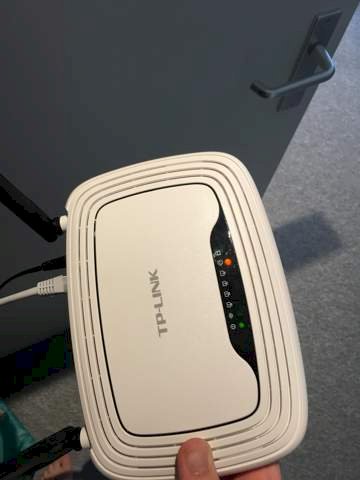
the green light at the Wi-Fi symbol is very weak.
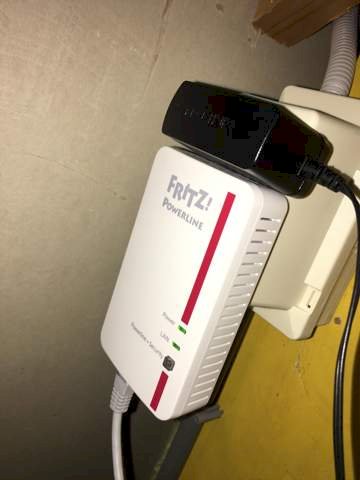
Can someone help me?
First switch everything off.
After about half an hour, just turn on the router again.
When it is completely powered up, test the connection near the router with the laptop. If that did not help, I would assume that a new router is due.
If it runs there you can integrate the repeater again and test again how bad the network has become.
This TP-Link router should only serve as a WLAN access point? And depends on the Powerline adapter?
Then you have to switch off the DHCP server in the TP-Link router and manually assign it an IP that is in the same network as your "correct" router.
https://www.tp-link.com/de/support/faq/962/
Okay great thanks I'll try that out
For me it also looks like it is just a Powerline adapter with an AccessPoint on it.
So the problem will be on the other side of the outlet. Where the Powerline is fed in.
The connection is probably limited precisely because Wi-Fi is there, but on the other hand the connection is disturbed in some way.
No, the problem will lie in the configuration of the access point…
I assumed that the connection worked at all. Because normally the configuration does not change. Of course you should also check it out.
Limited means you have to log in to the Wi-Fi.
the best thing is to find out the exact name at tplink, then I will look at the manual.
the powerline is probably a repeater i suppose?
please also check the relationship, somewhere on the housing
then enter in the browser address 192.168.0.1 whether you come into the router
I will be available again this afternoon from 1400 and will contact you
Exactly, the connection worked normally. Then there were always disturbances, mostly 5-15 minutes. And now it's been a few days.
That sounds like one of the devices involved is defective.
But it may also be that a new device has started up in the power grid that interferes with the transmission with powerline.
The powerline has a counterpart somewhere, right. There must be a route through the power line. Probably one powerline hangs near the router, the other at the pc.
the router is a tplink840N
Yes, the router and the DSL connection are missing
I hope you are not really an IT businessman…
How come?
Because your statements testify to very little expertise on the subject… Sry, if I have to say that…
You immediately become irrelevant, which basically means insecurity, and you have every reason to do so. I'll keep an eye on how you solve this, could be amusing,
Mister access point
Well, basically you are becoming objective now…
If you do not see that the TP-Link router should obviously be used as an access point, as it is connected in the picture, then I can't help you… I can solve everything as soon as more input comes from the FS.
limited means you have to log in to the Wi-Fi
That alone is total ignorance…
the powerline is probably a repeater i suppose?
No, as the name suggests, Powerline is a D-LAN adapter…
You're boring me, what's next?


