Is it easy to get used to Linux from Windows?
I would like to buy a new laptop soon and use Linux as the operating system on it, because many say that it is better than Windows and I would like to try it out. If you've been using Windows all your life, is it easy to move to Linux and understand Linux?
It depends on what you want to use your PC for. Everything that is standard software (Office, browser, graphics, etc.) is also available for Linux and is already included in many packages. If you have more specific requirements, it can be more difficult. You may have to part with programs you have grown fond of and use alternatives, or see if you can get the program to work with the help of WINE or similar auxiliary programs. That works often, but not always.
It becomes difficult with current games that were written for Windows. You usually don't get that stuff going. Everything that is played in the browser usually works fine.
As a Linux novice, I would recommend the Linux Mint Cinnamon distribution. It has a desktop with a start menu and task bar: https://linuxmint.com/...xmint.com/ The installation is easy to carry out even for laypeople because most of the installation is automatic. The hardware is also set up automatically during installation.
This is what the Linux Mint Cinnamon desktop looks like:
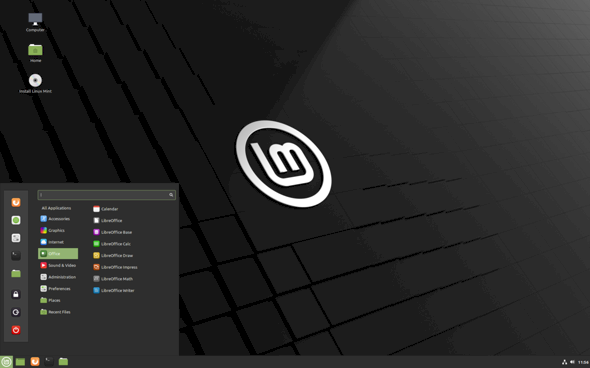
As you can see, the start menu is divided into categories. That makes the whole thing clear. The taskbar with clock, volume, network / WLAN, Bluetooth also looks familiar. If you e.g. When an external USB hard drive is plugged in, an icon appears on the desktop and can then be accessed.
Under Linux Mint, programs are installed via application management. This is comparable to an app store and is also served that way. This is how it looks:
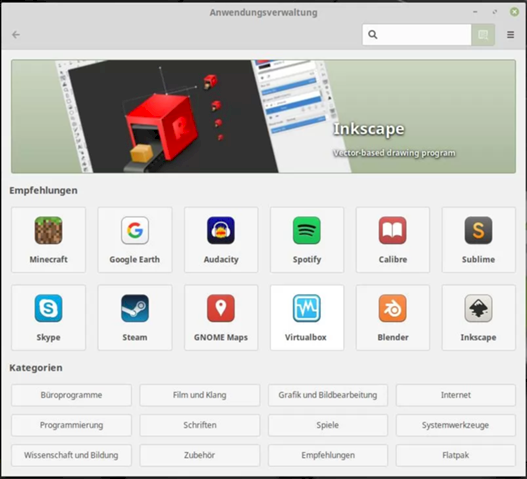
Depending on what is installed, an entry is added to the corresponding category in the start menu.
It depends on what you want to do with it.
For the 08/15 office and internet needs, there are now many good distributions that make the change as pleasant as possible.
Linux Mint would be a good example.
After installation, it comes with a selection of basic software for Office, playback of music and videos and a browser. You can then search for new programs in the software center and install them with a click (almost like in the AppStore on your mobile phone).
Gaming or the operation of exotic hardware can make the switch a bit tricky.
When looking for tutorials on the Internet, one often comes across command line commands to enter. This is quite popular in the community because it is easier to post a command to copy in a forum than to describe the click path through menus to someone, which can vary greatly depending on the desktop environment. These command line commands tend to be daunting for beginners, but in the end it is optional for you whether you understand what they are doing or whether you are just happy that they are doing the right thing.
Anyone who is new to Linux quickly learns that this system offers considerably more options than Windows.
The range of distributions ranges from beginner-friendly to professional, there's something for everyone. Another advantage is that Linux is really easy to maintain. In the last few years I only had 1 severe problem after an update. Troubleshooting took about 5 minutes in the console. Took because the community was already able to offer a solution. And that with a distri that is expressly not recommended for beginners.
Drivers are usually not a problem, the common ones are already built into the kernel. However, some research should be done before buying.
Microsoft has also sneaked in:
The other way round it is immensely more difficult.
I had some problems understanding when I had to switch from Unix (the father of Linux, so to speak) to Windows. Suddenly there were drives even though there was only one hard drive installed. I didn't know things like "full control". When installing a second hard drive, everything was shifted.
In short, it was a culture shock.
This has not changed significantly even after a Windows administrator course. Only the pictures and where to click were explained.
If you have learned it all by heart anyway, we will have problems forgetting all of it when using Linux.
I have it. Since 2000 I only use Linux (I also write this text under openSuSE Leap 15.2 with Firefox).
If you want to do more with Linux than start a program, the system offers everything. From this some then deduce that this is terribly complicated.
You can play around with it, but it is not necessary.
If you have overcome the first hurdle, "Installation", there should be no insurmountable problems.
Depending on the distribution, the well-known Thunderbird (for e-mail), Firefox as a WEB browser, any file manager (something like Explorer), programs for Office (similar to MS-Word), image viewers… Are installed right away.
One more thing, forget the importance of filename extensions. For
Linux itself does not care whether an executable program is called .exe or .doc or .jpg or ---. However, some user programs "insist" on such extensions.
Actually, they are only good for people who use them to create a certain order.
I prefer openSuSE simple, logical, stable…
If I can do that at 75, younger ones will too.
Take courage!
The hardest thing is to forget some things.


