AMD driver error?
So when I install the AMD driver for my laptop I get this error when I try to open the setting, how can I fix it?
see image
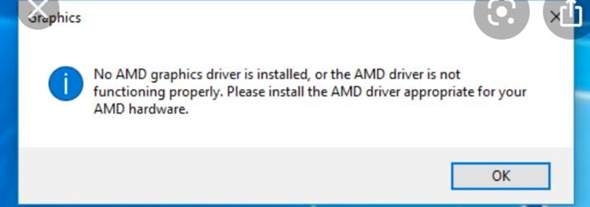
This is because there's no AMD graphics card installed in your laptop. How do you want to use the graphics drivers without a built-in graphics card even if you get 0 better performance? Software are not magicians but can only access hardware and only fulfill your wishes what the hardware has to offer.
An AMD graphics card is of course installed 🤦♂️
What kind of graphics card is built into the laptop?
Have you uninstalled the driver before and then reinstalled it?
AMD Radeon R7 M260
Yes
OK? Are you sure that you have also selected suitable AMD drivers for your graphics card model?
Yes, I did not use an auto detect tool from AMD, I also tried to install it manually
If you go to Device Manager and see if Windows recognizes your graphics card at all.
Yes is recognized
Did you download it in 32bit or 64bit?
64
And you also have 64bit Windows 10 right?
Yes
OK. The error message says the following: No AMD graphics driver is installed or the AMD driver is not working properly. Please install the appropriate AMD driver for your AMD.
Ever tried installing drivers from this site?: https://www.amd.com/...on-r7-m260
YES I installed it from there
Ok that's really weird.
That's why I found a video on how to fix it, which is unfortunately in English but maybe it would still help you:
Hi
Please do not use "detect tools" or the drivers from AMD. Download the drivers from the manufacturer's website of your notebook. They are often specially adapted to the hardware by the OEM and work best. It is even imperative to use the drivers from the OEM manufacturer when using a dual graphics solution in notebooks. So if an extra graphics card and an integrated graphics processor work together and depending on the power requirement, you can switch between the two. In this case, the standard drivers from AMD do nothing. The control e.g. The brightness, via Fn special functions, usually only works with appropriately adapted drivers from the OEM manufacturer.
I also tried to install the laptop from the manufacturer, but it still doesn't work
Then either the graphics card is defective or your Windows is spinning. Which notebook do you have exactly? Not only the model series but also the exact model name.


