How can you turn off the laptop now if that doesn't work?
So we have a big problem. Because we were just about to turn off the laptop, but it just doesn't work. Because the Windows is completely frozen, we even pressed the power button for 1 minute, it doesn't work either. The battery is also permanently installed and can't be removed.
And worst of all, the laptop rattles so loudly all the time, and just as we were about to sleep, this noise bothers us. What now?
Just leave it out of the plug long enough and then he'll run out of juice anyway!
Press the power button for longer than 5 seconds (have you already tried it).
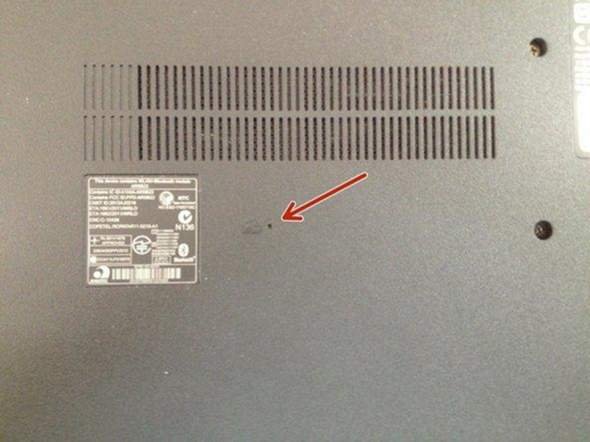
Depends on the notebook… They often have a Lenovo NOVA
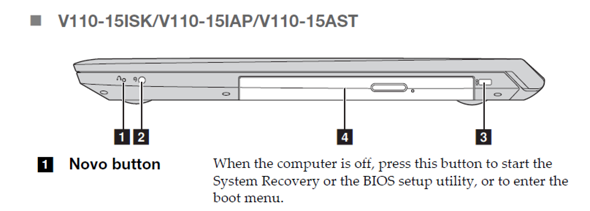
Reset button on the bottom of the notebook
You take out the battery.
Back. There's a clasp. Push aside with a screwdriver. Battery out and in.
Then your laptop is at zero.
Everything works again.
Is that also part of data protection if you don't name the type of laptop?
Open the device, then you have several options:
Battery found → disconnect.
Find the processor, remove the heat sink, read the name, look for the reset cable in the data sheet, trigger a reset, mount the heat sink properly. - Warning, not a good solution. Removing the heat sink will cause the processor to die from heat. But it works!
But there are a wide variety of interfaces in the notebook. Almost every interface also has a reset line. E.g. The interface for CD-Rom. Now all you have to do is look for the interface description on the Internet to locate the reset line and trigger a reset. - Not that easy, but it works and is safe.


