GIMP 2.10 - brush jerking?
I have already looked on the Internet and got the tip that I should set the distance of the brush to zero. However, I do not know how it works and if it is the solution at all. I reset the settings, restarted the program and also restarted my laptop. I doubt that my laptop is overloaded, because it has already worked flawless times before.
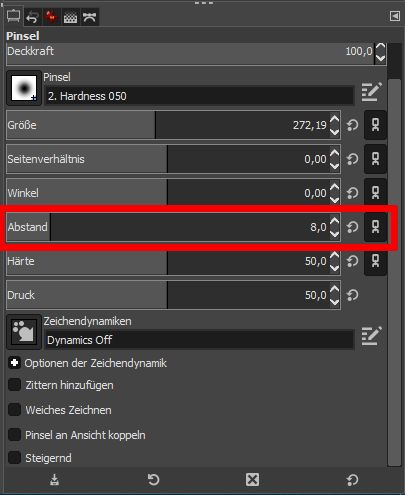
You can specify the distance in the tool settings:
Opening the eyes seems to help. Did not work, but thanks anyway.
Explain what you mean by "jerking", that's not a clear description of the problem for me. Or show a picture of a jerky line here.
And do the following test: With the brush, draw a horizontal straight line by clicking on the starting point of the line with the brush, then holding down the capital letter key and clicking on the end of the line.
Below you paint by hand a horizontal line.
If the "bucking" occurs only in the hand-painted line, it's probably not the brush settings, it's yours.
P.S.: Which character dynamics did you set?
It was the character dynamics that were set 'wrong'. Was on 'Dynamics Random'. I should really go through the simple solutions first, before I ask around here.


