Sound over laptop despite headset?
I use a headset to play Teamspeak and would like to set the sound on the laptop, so I only use the microphone of the headset, as I always get a terrible headache when I have the headset on my head. Can you configure that somewhere?
A heartfelt thank you
About the Control Panel.
For playback and recording, select the appropriate hardware individually.
I heard a picture is worth a thousand words…
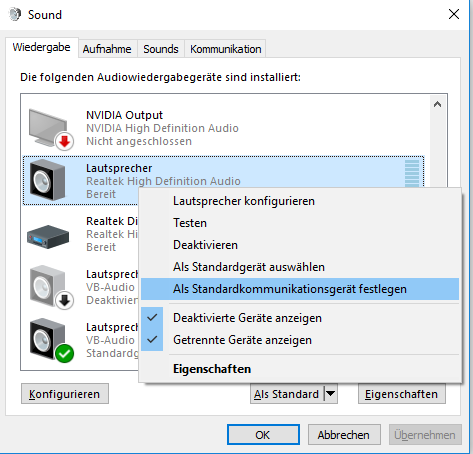
Dear SkullCandy,
Of course, that's easy, that's easy!
TeamSpeak:
Tools »Options» Playback »Select your PC speaker
Tools »Options» Recording »Select your headset microphone
Games:
Simply enter the bottom left sound (before you start the game), playback devices your PC speakers as default (if you come in the menu of the control panel). In the Windows menu, simply select your PC speaker as output!


