USB HEADSET IS NOT RECOGNIZED BY LAPTOP?
Something very clumsy happened to me and wanted to ask for advice.
My headset has 2 audio outputs, one via jack and one via USB.
Unfortunately my jack in my laptop broke and got stuck deep inside. No chance to get them out!
If I now want to run my headset via USB, I don't get any sound.
Is it probably due to the broken handle? Is it possible to deactivate the audio jack and to give the USB connection "priority" so that I can get the sound via USB?
Counter question: Do you have the latest driver?
Maybe deactivate in the device manager, or change in the sound settings.
Problem:
Due to the remains of the plug in the headphone jack, your laptop thinks that there's a headphone in it and assumes that you want to use it for playback.
Solution:
Click the speaker icon in the lower right corner of the taskbar.
Above the volume, you can call up a list of all active playback devices by clicking on the small triangle next to the playback device.
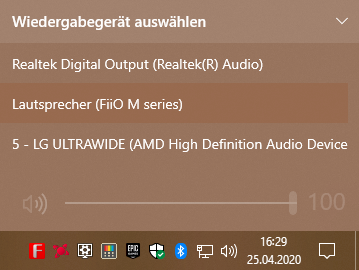
You can then tell your laptop which playback device to use.
I took the screenshots under Windows 10, but it works accordingly under Windows 7/8
Hi, unfortunately the headset has no driver. Is now on an expensive headset.
My goal is to get the sound through USB and not through the speakers, thanks anyway.
If your headset is connected, it will also be listed there.


