How do I configure a LAN network?
I wanted to set up a LAN network with all of our devices under Windows 10 today and it only worked out so moderately.
I have managed that Pc 1 and Pc 2 can communicate with each other, but it does not work properly with the Wi-Fi router in the middle, because laptop 1 and laptop 2 are not recognized by the other devices, but they do.
I suspect that it is related to the Ip's of the devices, since laptop 1 and laptop 2 inevitably have a different "Lan subgroup" due to the Wi-Fi router.
For example, Pc 1 and Pc 2 have the following Ip pattern: 192.168.0.x
and laptop 1 or laptop 2: 192.168.1.x
I was able to work around the problem by connecting the laptops directly to the modem, without the Wi-Fi router as an intermediate device.
I hope you can help me to solve the problem, as I would like to have access to the printer on every device that is connected to laptop 1.
Lg Manuel
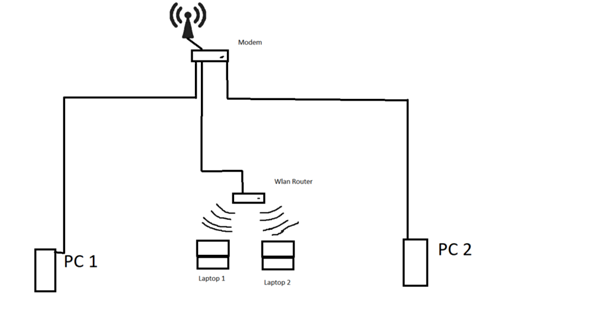
3 devices on one modem do not work.
PC 1 and PC 2 are not in the same network as the two laptops.
What is the reason not to use a router with a built-in modem and then to connect all devices there?
I was probably stupid, but the modem has a router built in
If the "MoDem" is a "router", I would exchange it for a router with WLAN. Then the problems are a thing of the past.
Yes, the problem is only the router / modem is in the attic, so rather too far away for a Wi-Fi connection. In addition, the PCs do not have a Wi-Fi card
The problem will be that you are using a router to provide the Wi-Fi and you have two different IP networks. You would have to work with static routing tables. However, I would prefer to either replace the modem (main connection) with a FritzBox or the WLAN router with an access point.
What kind of Wi-Fi router is that the laptops are attached to? Maybe you can configure it as an access point - that would fix your problem immediately.
Most routers have the function of not being used as a "real" router with a DHCP server. But rather as an access point with a switch. Depending on which router you have, this function is called differently. You just have to google it, or if you can't find it, you can also tell me your model name and I'll see if I can find anything.
You probably have 2 (Wi-Fi) routers in the house, and the DHCP server is probably activated in both. For this reason, you have two separate networks that do not reach each other. Conclusion: You have set up your 2nd Wi-Fi router (above) incorrectly.
Solution:
You have to set up the 2nd router as an IP client with the DHCP server switched off.
In principle, therefore:
Leave the 1st modem router as it is, everything will fit. Set up the 2nd WLAN router (above) as an IP client. If there are no instructions in the manual, then first connect only the 2nd router to a laptop via WLAN or LAN and change the IP address to an IP address on the configuration page of the 2nd router (callable with 192.168.1.1) from the network of the 1st router (proposal 192.168.0.222). Now switch off / deactivate the DHCP server in the 2nd router! Set subnet mask 255.255.255.0 and gateway and DNS both with 192.168.0.1. Finished!
Now you can connect the routers with LAN1 to LAN1 (depending on the manufacturer of the second router, you may also be able to use the WAN connection for the LAN connection, see the manual). All devices (whether LAN or WLAN) are then in the same network 192.168.0.x with subnet mask 255.255.255.0 and all of them are fully automatically assigned to gateway and DNS with 192.168.0.1.
Note: You can then access the configuration page of the 2nd router with the browser at 192.168.0.222
Here it explains AVM:
PS:
Connect the printer as a network printer, ideally with a LAN cable to the router at the top or bottom (it is easy). Then this printer can even be used by all devices (including smartphones), even when the computers are switched off, since it then hangs as a network printer on the router and does not require a PC to be used. Network printer can be used by any network participant! Search for network printers in Windows!
To understand better:
IP client means that the router receives its IP configuration (IP address, subnet mask, gateway, DNS) fully automatically from a DHCP server (your 1st router) in the network. Of course, only if he has a connection to the 1st router.
A DHCP server distributes the IP addresses in a network and fully automatically configures all network participants (laptop, PC, smartphones, network printer, etc.)
Oops, I'm reading, your internet connection is "up" and not "down".
So please exchange the words "top" and "bottom" in my description, then it fits your circumstances.


