Windows 10 screen resolution setting?
After many years with iMac, I finally have a Windows laptop. Since I don't know much I would like to have a look at some general settings with someone who knows my stuff?
Among other things, I do not know where I can change the resolution of the screen exactly? Where can I find this?
Right click on the desktop and then something like display settings.
Right-click on the free area of the desktop with the mouse pointer and then adjust screen settings… Or something like that… Pretty much at the bottom of the context menu that appears
Many roads lead to Rome ;-)
right click on the desktop> display settings
Start menu> gear> search there
[Windows key] + [i]> Search there
or simply type "resolution" in the start menu ;-)
Many things have been greatly simplified since Windows Vista. Unfortunately, however, in such a way that many initially do not dare to take advantage of the opportunities. You dare.
I have my doubts that after almost a year you still fail to lure people into your teamview sessions.
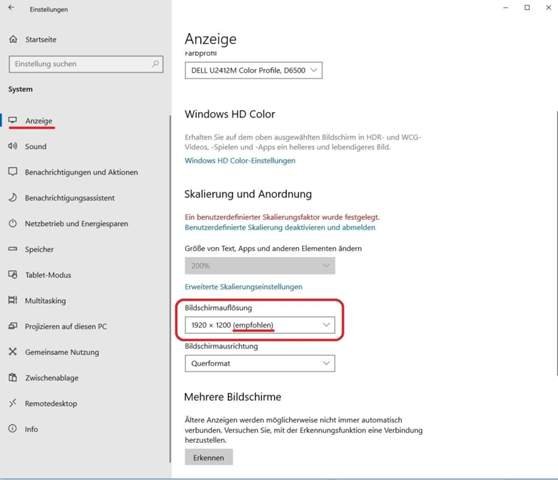
In the start menu go to Settings> System> Display.
Under "Screen resolution" select the resolution behind which "(recommended)" is written. See picture example.
Settings that deviate from this result in a blurred image and possibly also in a distorted image display.
If the correct graphics card driver is installed, Windows will automatically set the recommended resolution.