Windows 10 installation error?
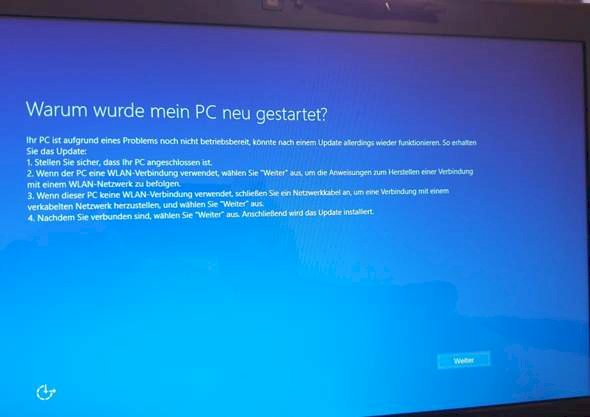
I just reset my laptop and keep getting this message after installation so I can't do anything. Can help with soy?
(see image)
Have you clicked through there already? If so, what were the errors?
Only this screen comes up, I connected everything (Lan cable and power cable) but I come back to this screen
At the bottom right is a button with "Next", if your touchpad does not respond connect an external mouse (preferably with a cable) or try to navigate through the menu with the keyboard (arrow keys and Enter to select), you should get at least more information if it fails later
I press continue and it starts again with this message
Then the automatic tool for repair is probably scrap again. If you have an installation CD from Windows or more recently USB sticks, you can use it to boot and perform a clean installation, i.e. Completely format the data carrier and manually reinstall Windows. If you press F8 when the stick is inserted when starting, you can usually select the data carrier to boot - you want the stick there. However, the F key can vary. Then you come to the setup, where you want to format your data carrier first and then select the one for installation.
I recommend reinstalling Windows 10 cleanly. To do this, download the Media Creation Tool from the Microsoft website on another computer. You can use it to create a Windows 10 USB boot stick. You need an empty formatted USB stick. The Media Creation Tool also packs all updates on the stick.
Then boot the created stick on the affected laptop and follow the instructions of the installer. It offers the possibility to delete everything. During the installation, the laptop is restarted several times. If the laptop was delivered with Windows 10, you do not have to enter a product key during installation because it is permanently integrated in the BIOS and is automatically adopted.
When the installation is complete and Windows 10 starts for the first time, go to the manufacturer's website of the laptop. Download and install the drivers there.
It is always better to reinstall cleanly than to reset. The Windows 10 USB boot stick should be kept safe for emergencies.


