Does overclocking or permanent turbo mode on the i7 in my MacBook Pro shorten the life of my CPU?
I wanted a bit more performance from my MacBook Pro 15 "from Late 13. I installed the Volta software and have now set that the CPU should remain in Turbo mode. The CPU now works constantly at 2,900 MHz and 0.96 V. As a result, the laptop is faster and works smoother and, above all, reacts faster.
My question now is: Does this shorten the life of my CPU or does it have other negative consequences for my system?
Love from
No, I don't think that makes a difference in the lifespan. Which year of construction?
Not really. Do this on every PC and also on my Raspberry Pi 4 and have no problems or other irregularities regarding the life of the CPU.
The laptop is from the end of 2013
The main thing is that it is cooled properly or it does not heat up too much (100 ° C is usually the limit temperature)
MacBooks generally have a miserable cooling system, so raising the CPU temperatures even further is not recommended. Yes, high temperatures can have a negative impact on lifetime. If the temperatures rise too high, the processor's overheating protection can also be activated, which massively reduces its clock rate (I mean to 0.8 MHz), provided that this tool does not prevent this. If it should prevent this, it could actually damage the CPU.
Keeping CPUs cool in laptops is generally quite difficult, and it is absolutely not a good idea to make this problem worse, even with better-cooled laptops it is not a good idea, and certainly not with MacBooks and their undersized cooling.
Hi
The answer is yes. On the one hand, the temperature of the processor increases during clocking and constant heating and cooling, i.e. Constant expansion and contraction, sooner or later damages the semiconductor material. I can't predict how long this will take. On the other hand, it increases with higher voltage and power loss, which e.g. When overclocking, electromigration is also the case. Here is what it is:
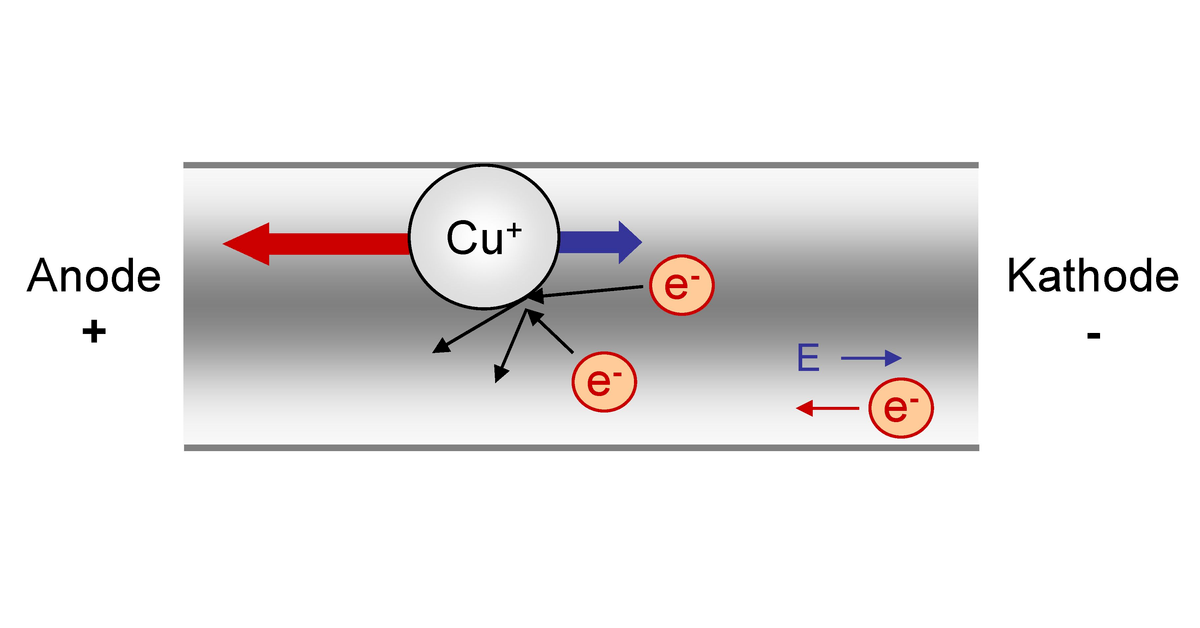
https://de.wikipedia.org/...omigration
These are the two main reasons why semiconductors eventually give up, even if they can't wear out mechanically. Semiconductors wear out electrically and wear increases with increasing load. Just an example. At Christmas 2012 an i7 2700K, from a friend of mine, got 8GB of DRR3-1600 memory. The memory controller in the processor supports up to DDR3-1333. This overclocked the memory controller. However, the computer was still stable until June 2015, about 2½ years, when blue screens suddenly appeared with error codes that indicated memory errors. The end of the song, the processor now only runs with DDR3-1333 RAM, however, as far as I know, to this day. But the memory controller has been damaged and remains so, even if the processor is still working today.
PS.: This not only applies to your MacBook, but to all devices with semiconductors
It is actually true that the cooling is relatively weak. But by controlling the fans, everything stays below 80 * C.
The fan would normally only be used at 100 C and turn up fully. With me, they gradually start at 50 C.
I added the question and answered Ireeb. Does your execution still apply?
At 100 ° C it would be almost too late. A CPU should not have more than 80 ° C, 60 ° C are desirable for optimal performance, since CPUs, as I said, regulate their performance depending on the temperature.


