MacBookAir, hard drive, Macintosh etc?
I have a Macbook Air (Retina, 13 inch, 2019), 8GB memory, 1.6GHz dual-core Intel Core i5 processor.
I have had this since September 2019 and I mainly use it for university. But I don't need any great programs, actually only use Google Chrome and Word, and I also have Origin for Sims.
Now I wanted to do the new software update, but I don't have enough memory. I don't understand anything about laptops and IT stuff, can someone tell me what to do to free up some memory space? I've already deleted a few documents, emptied the trash and deleted history everywhere. I don't have any music or photos on my laptop. I don't understand what could take up that much space? What is this "Macintosh HD data" that takes up so much space? (see photo). Can't I buy additional storage somewhere / somehow? (I can't imagine it's because of Sims, since a friend also has Origin and other games on it and still has enough memory.)
Help, I'm really desperate… I have to study a few more semesters and it would be a shame if my Macbook is already full.
I thank you for answers!
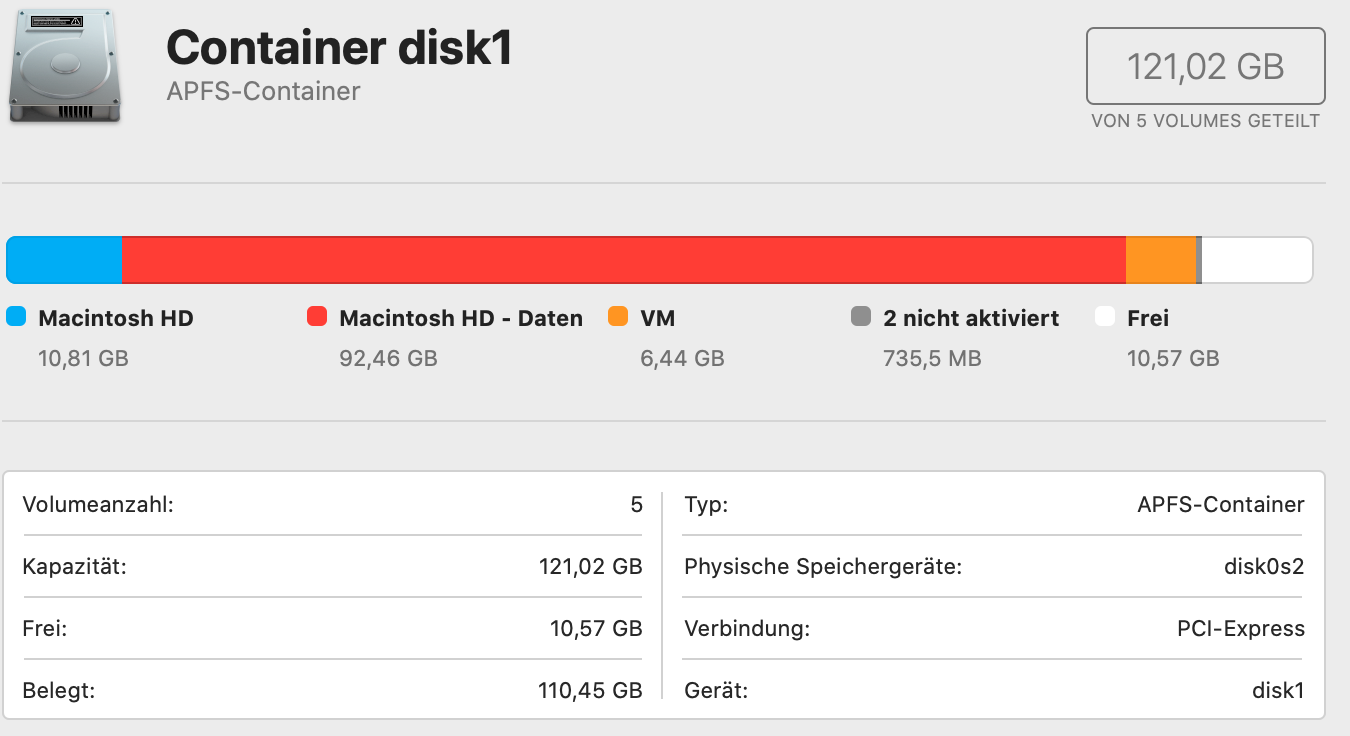
It seems like a lot of data has accumulated. Macintosh HD data is a volume on which all of your data (videos, music, photos, games, etc.) is stored. Perhaps you have downloaded a large amount of data and saved it in the download folder?
You would have to do a search and see what exactly triggers the hunger for data.
What you could do: Save as much data as possible on the computer on an external medium (USB stick, external hard drive, etc.), then delete the data once from your Mac after backup, and then download and install the update when you update absolutely need.
Alternatively, it could actually help (if you have the time and inclination) to back up the most important data that you need and to set up the entire system again. Sometimes it can be that too much other garbage accumulates without you noticing. For the installation, at least the above step would help!


