Disk always at 100% what to do?
I have a relatively new laptop (built in 2018) and the laptop is running very slowly I do not have a lot of files on it and no virus. What is it? And what can I do
Thanks in advance
Share your disk and defragment it
Also happens, if you have too many programs on it also virus programs
Or you have too many clipboards
And that means something stupid: -D
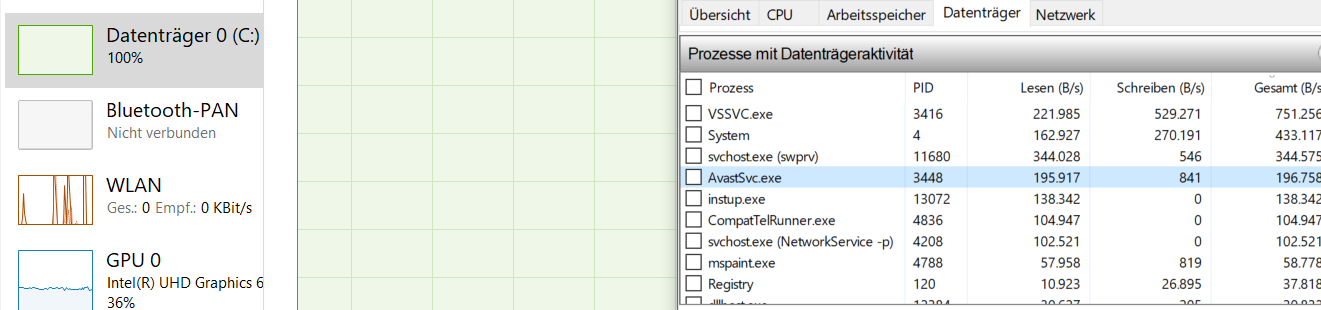
So in the screenshots I see nothing regarding your CPU, but that your HDD / SSD is 100% busy.
Much seems to be required by the VSSVC.EXE (Volume Shadow Copy) service, which backs up files and settings in the background.
It may be that he uses this increasingly now after an update or because of a reset increasingly used, in which case you should run the notebook once overnight, so that the fuse can pass completely once, the next day, the problem should then have eliminated yourself.
If that still does not work Google just how you can turn off this service (but at the expense of data and possibly reliability).
Not your CPU is the problem but your hard drive is full (drive C.
First clean up the garbage:
https://praxistipps.chip.de/...ehts_34732
If you have a second partition (drive D.) move your personal data (pictures, downloads, etc.) there.
What slows down your laptop is the attempt to outsource Windows parts, which are currently not needed in the main memory, to the hard disk.
That does not work, because this is already full!
So the system constantly pushes data between memory and hard drive back and forth and therefore hardly comes to work.
See also:
https://www.n-tv.de/technik/Windows-10-aufraeumen-und-Platz-schaffen-article20369945.html


