I need help urgently! Printer stopped working?
The printer stopped working from one day to the next, colleague had the same problem. There a copy of the printer was made on the laptop and it has been working again ever since. But I don't know how to do it. Use a laptop with Windows 7. Can someone help me or suggest other solutions?
Since there should be several printers, can you tell us the type?
What error message?
How is the printer connected?
Just bring him some flowers.
HP Color LaserJet Pro. Print job could not be completed
Does the printer have the same ip as your computer? Is the driver on the printer up to date?
Via the Internet or Bluetooth
Internet? Unlikely…
Does the printer have the same ip as your computer?
That wouldn't be so good.
I'd just reinstall the printer driver. It is best to uninstall the old printer driver beforehand.
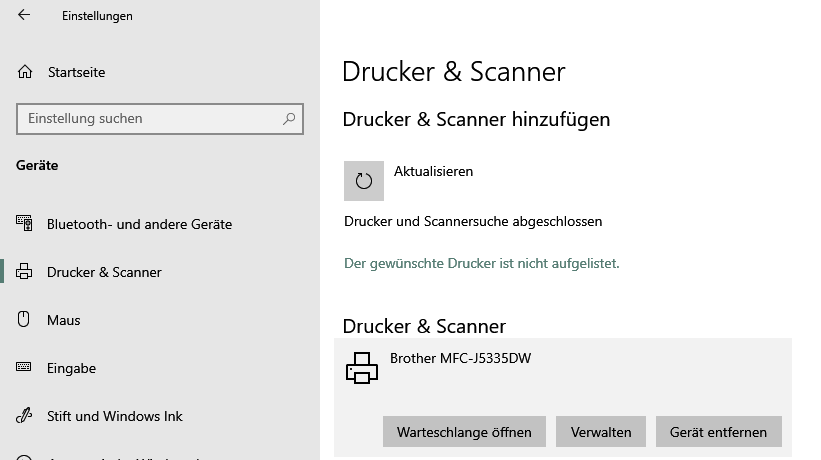
Specifying the printer type would be very beneficial. In general, you can remove and reinstall the printer under Windows 10. You can automatically search for and add printers that are not (yet) installed under "Printers & Scanners":
Stay healthy!
Culles
In all honesty, I have no idea about it or the technique. I'm usually responsible for the other area, but we don't have an IT technician in the company
I disconnected the printer and just reinstalled.
The printer must work with the same IP otherwise it does not recognize the whole computer.
No, then you only get an IP conflict.
This is how it should be (example):
Router 193.168.178.1
Calculator 193.168.178.20
Printer 193.168.178. 5
The same network is of course required.
Yes, the subnet should not be completely the same. The main thing is in the same network.


