HDMI connection to PC does not work?
I got my new PC today and if I want to connect my screen to the normal HDMI connection, then nothing happens. The screen worked on my old laptop. So somehow the HDMI connection does not work on the PC or anything else. Are there ways to find out what's wrong? And are there alternatives to the HDMI connection somehow via another cable or adapter?
DVI to HDMI e.g.
Stay healthy
greeting
Connect your hdmi to your graphics card
Hi, which processor is installed?
What CPU do you have?
Is there a dedicated graphics card in the computer?
Do you mean the connection to the mainboard with the normal HDMI connection?
Has the PC installed a graphics card? If so, this normally deactivates the motherboard itself.
Accordingly, you have to connect the screen to the graphics card so that you get a picture.
Yes, the PC has a graphics card installed. Then where do I have to connect it?
Intel (R) Core (TM) i7-600k CPU
Intel (R) Core (TM) i7-600k CPU
Ok, where do you actually connect the monitor? Graphics card or mainboard?
The display ports of the graphics card should be visible on the back.
Here is a sample image from the back of a PC.
The blue bordered are the connections of the mainboard. The red bordered are the connectors of the graphics card.
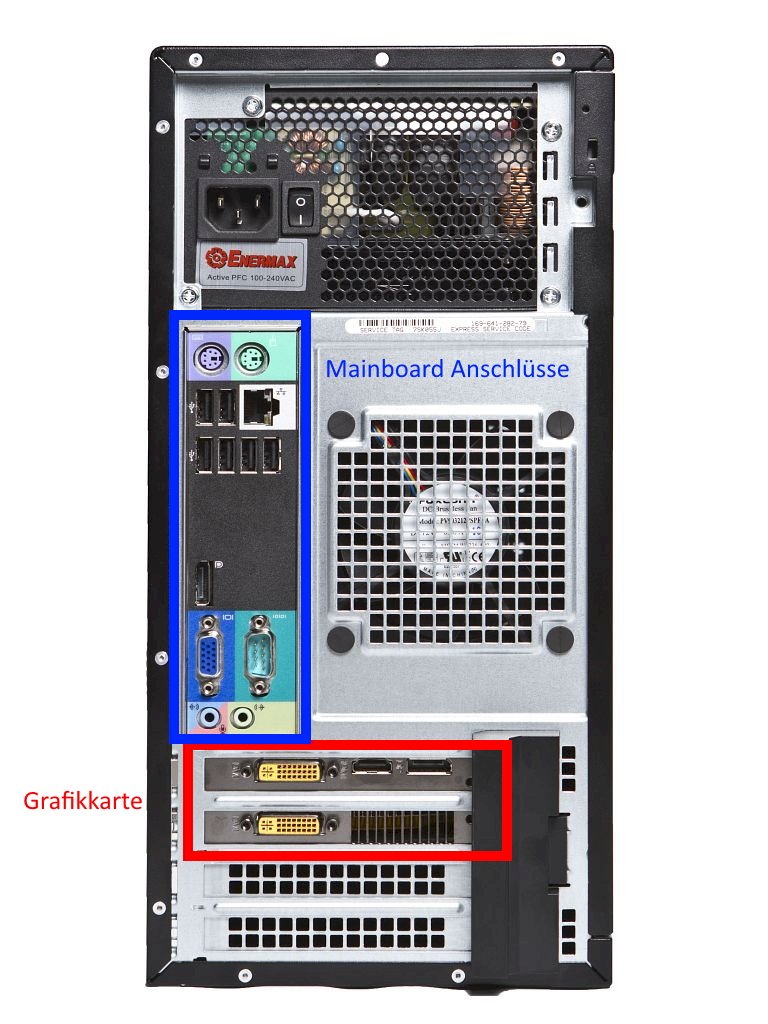
Motherboard
Exactly on the red with the graphics card the screen goes but with the blue one on the mainboard the screen does not go. Can you somehow do it with the mainboard because I would like to use multiple screens.
There's no 600K…
There's an 8600K, a 9600K, a 2600K…
No extra graphics in the calculator?
Today's graphics cards should actually have multiple display ports. I have e.g. Three screens connected to the graphics card and one connection free.
With some PCs you can set in the BIOS / UEFI that you can also use the monitor connection of the mainboard. To do this, the hardware must also support this.
So it's best to connect all screens to the graphics card. If no HDMI connection is free, there are also adapters from most monitor connections u HDMI.
On my PC there's only one connection to the graphics card
Ok, then connect the monitor to your graphics card. If it doesn't have HDMI, you need an adapter.


