Laptop just crash after reset
So there comes as this (see picture) and then it says as we start again for you and then it is an infinite process.
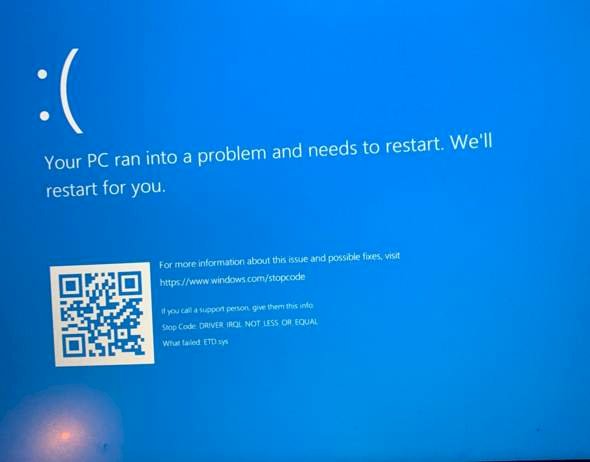
Something broke in the process. If it works again experts ask who looks at it
Let it load a bit and then you turn it off and on again
should then work
What a great analysis
Sorry, you just need more information than just not working?!
How more info do you see the picture?!
They just think it's funny
This happens before or after the POST (Power On Self Test - Where the brand of the laptop appears).
If after: Then you can try while the PC starts up with F1, F2 or ESC (depending on which it could also be a different key, you have to google for the brand of the laptop) try to get into the boot menu (just key spam during he starts up). From there you can select the hard drive on which Windows is installed and start from there. If this still does not work, there should also be the option in the boot menu to start in safe mode.
Maybe that will help.
Yes, everyone has something if something is not possible, probably something on the laptop
Your hard drive is damaged wherever possible. Boot up your PC (depending on the PC, but mostly spam F2, F5, F8, F10, F11 or F12 during the start) and then go to automatic repair if that doesn't help try other options such as starting in safe mode.
Unfortunately, this only works in 10% of the cases.
Whenever I want to start my pc it comes, so first comes the Acer logo and then it happens, it is restarted as and I unfortunately know which button works for booting I've tried so many with my colleague.
Win CD is pure repair and good.
For Acer it should be the F2 key. Start the PC and as soon as you see the logo you quickly press the F2 key again and again. Just spam. And don't stop until either the BIOS or the error message comes up. If F2 shouldn't work, it should almost certainly be F12. It is one of the two. Try it again.
So I get into the bios but don't know where to go, what do I have to do with bios?
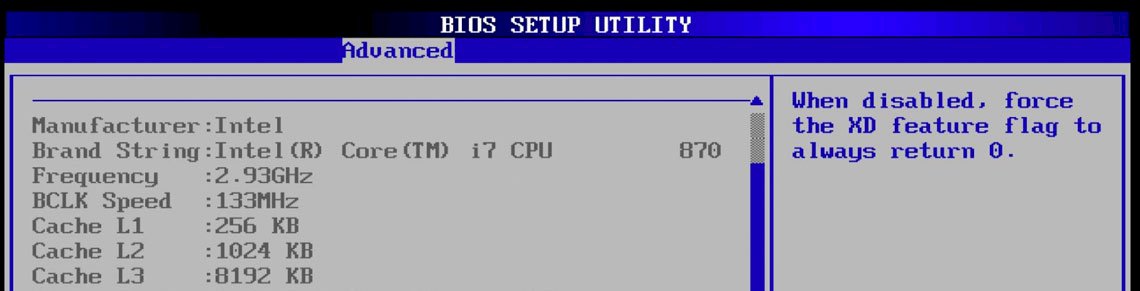
Are you in the bios It looks like this:
There's no cd slot
CD… Today's laptops come practically all without a CD drive. CD is over…
Yeah right
But I don't know afterwards my colleague also tried to do something there but he didn't get out
You should now be able to navigate in the menu using the arrow keys and the function keys. Can you find a selection somewhere that has to do with "BOOT" or "hard disk" or "installation"?
Yes
There should be a list there. Is there an option called "SAFE MODE" or "SECURE BOOT"?
Do you have any Instagram? Then I could send you a picture, because I only have boot mode (uefi)
secure boot: enabled
and
windows boot manager
hdd: kingston rb…
USB FED:
network boot -Ipv4
usb hdd
usb cdrom
network boot ipv6
Hmm no sry that is unfortunately not possible. I would like to remain anonymous here if it is right. I know is annoying: / wish it would be easier with photos and such.
Try navigating to No. 1 with TAB and then press ENTER. Then you should go to Windows Boot Manager. Windows will provide you with a few options there. One of them should be "TROUBLESHOOT" or "TROUBLESHOOTING". Navigate to this and let Windows repair itself. Let's see if it works
PS: Do you have Windows 10 or 8 or what exactly?
I press enter nothing happens oh man
Windows 10
Okay xD we can do it!
So he goes first via MAIN> ENABLE BOOT MENU
Then press F10 to save and restart the PC.
Then this black list that you see in the video should appear automatically and come to the Windows boot manager. If it works, that means.
Perfect!
Thank you for helping me honestly 🙏, but this screen does not come after saving and restarting
Ok it came! What has to happen afterwards haha?
If you have BOOT Menu enabled, you no longer have to press F2 when starting. Did you do that or did you just let it start?
I then hit enter and the same error message came back with the blue screen
So I got into the black list in any case but then hit enter and it is like I said before that this blue screen comes back with a restart
It's a shame. Okay, I have a new idea.
Set the Boot Menu to Disable again and comment again when you have switched it off.
I have another way (maybe even easier way)
Ok i did
This guy also found another way to force the menu.
As soon as you see the blue screen, keep the ON / OFF button pressed until your PC shuts down.
Apparently if you do this 3 times, a new menu will appear in Windows.
There you can access the troubleshoot / problem solution as in the video.
Very important: do not select the reset option. This will reinstall Windows and you could lose data.
Go to "Advanced Options" or in German "Advanced Options" and then select "System Reset" e.g. "Restore system".
Maybe that works.
I actually want to completely restore everything because of the viruses so I don't want to keep anything haha
So you have a backup of your files? They would then be completely deleted and can't be restored.
If it doesn't matter to you then you are welcome to do a full reset. That would be much faster and Windows would then be guaranteed to work.
You just have to look because of the data. Everything you had until then would be gone unless you have an external backup.
Unfortunately doesn't work somehow.
I switch off and the same always arrives
It's a shame. Man!
Yes, such things are difficult to fix. I've had it many times. But even with remote maintenance that would not work.
Unfortunately you have to bring him to a support.
I'm sorry I couldn't help you and for the time you spent here with me in the comments.
No matter you're a great person.
Thank you for everything
Many thanks. You also.
Did you mean to call support?
Yes, call times and describe the problem like here in the forum. The best thing is what we tried and unfortunately it didn't work.
I don't know if you can solve this on the phone or if you have to send it in. I have to send in my HP laptop. Went 3 days then I had it fixed again etc. Everything went well. Maybe Acer also has such a service.
Ok now I do not know how to send in if you no longer have a guarantee?
Has it already expired? If so, free online support might also help. Here in Switzerland we have e.g. Swisscom that provides something like that. Do you have something like that in Germany?
Unfortunately I don't know 😔
Nope


