Question: What is wrong with my laptop?
I have reset the factory settings. Since then he shows me this: (see picture)
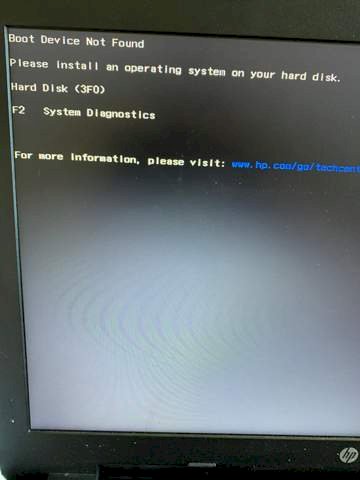
What should I do now?
If it was Windows, install Windows.
I would say that you deleted your Windows. Insert a Windows CD and reinstall it. ^^
How does this work? And where do I get windows serious as a CD?
See comment with instructions
Where can I get such a CD?
I would leave it to a specialist to install an operating system… Something like a PC doctor @Rodondon
You definitely don't take a CD anymore!
Simply drag it onto a stick with the "Media Creation Tool" from Microsoft: https://www.microsoft.com/.../windows10
After the installation you buy an OEM key from the bay for 5, - Taler.
Any 5-year-old can install an operating system today… That's 3 clicks.
He can't find the operating system. The hard disk must be in the first place in the BIOS boot menu. Is it still registered there? Otherwise reinstall Windows.
Unfortunately I have no other PC there
Something definitely went wrong when "resetting"… Your computer now wants an operating system.
Don't you have a buddy / neighbor who can help you?
Yes, but what would be possible, what kind of stick do I need?
A simple USB stick… Should be at least 8GB in size. You can get these things for a few cents ;-)
EBay, Amazon
The "Media Creation Tool" then makes the stick bootable and pulls the latest Win10 on it.
You then install that on your computer.
Link to Amazon?
And which one?
Did you have Windows 10 on it at all or is it an older computer that would not be able to handle Windows 10?
Was Windows 10 on it
Windows 10 Professional license key with bootable DISOGA USB-STICK NEW https://www.amazon.de/...07TLNJ79V/
Is the cheapest but with a USB stick. You would have to change the boot order in the BIOS so that the USB stick is first in the boot order so that the computer can boot from the USB stick.
Exactly, I just wanted to suggest that to you, see my further comment!
I accidentally sent it to myself 😀
I sent you an FA
Thank you, gladly accepted.
Check whether the HDD / SSD which Windows has installed is entered as boot drive.
If this is correct and Windows still does not start, download the Media Creator on another PC and create a boot medium (DVD, USB stick)
Boot with this medium and reinstall Win.
How can I change the order in the BIOS?
When you start the laptop, various messages appear. One of them is something like this: "Press F 12 for boot menu". It can also be another key! You press the button. The menu is then displayed.
When I start my pc comes only what I took a picture of above
That would be very unusual. Before the computer accesses the "Boot device", it first does a self-check and displays various messages.
So I doubt the accuracy of your statement. Press Ctrl-Alt-Del (or Ctrl-Alt-Del) and watch the screen.
No, I turn it on and then the above comes
How much time elapses between switching on and displaying?
2 seconds, just counted extra
How do you check if the Hdd is still there
I suspect your laptop is relatively new with a very fast CPU?
There are computers on which you can switch off the boot messages. Google according to the model and how you can call up the boot menu for your model.
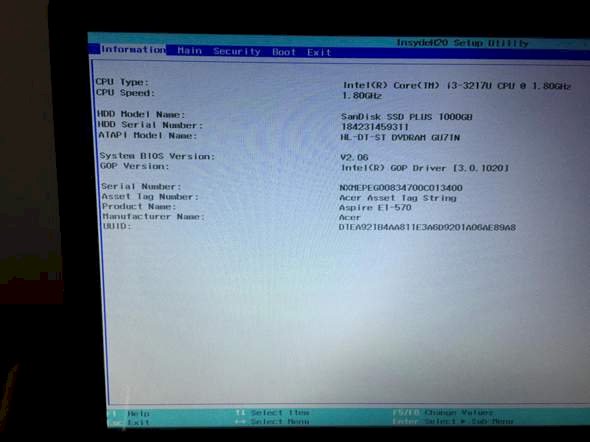
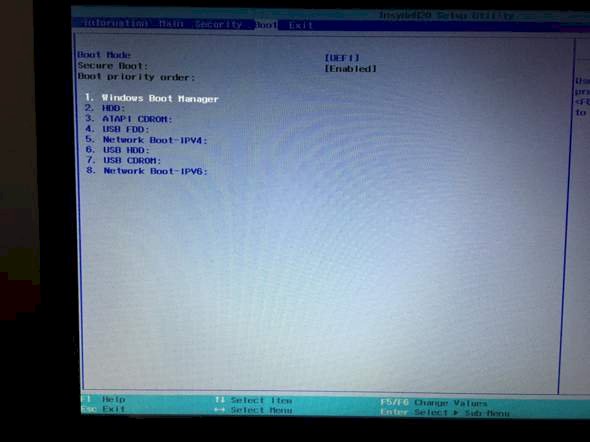
When starting the computer press "F2" the BIOS window opens.
First comes under the first menu item "INFORMATION" read from top to bottom: CPU TYPE, CPU SPEED and underneath it HDD MODE 1 NAME: (Your HDD or SSD should now be there.) If so, your hard disk is available and entered, that BS is deleted or incorrect.
If not, the hard drive is defective or the BIOS no longer recognizes it.
You do the boot sequence under the menu item "BOOT" above, with the arrow keys you go to "USB HDD" (is for an external hard drive but it is also possible for the stick) and push the "USB" with "F5" or "F6" HDD "up and then press" F10 "and then a window" Save and Changes and Exit Now "appears and then you press" YES "and the computer then boots from the stick and no longer first from the hard disk.
That was now the "BIOS" of an "ACER", but it may be that the BIOS of your computer differs somewhat, but in principle it is the same.
It must be visible in the BIOS. You can enter the BIOS by pressing F2 or the del key several times while the PC is starting up.
And if it is not visible? Does that prevent me?
Yes, then it can't work. In some BIOS you have to activate "Legacy Mode" so that all data carriers are recognized.


