Windows 10, I'm on my nerves?
I got a laptop today that has Windows 10. And I'm a beginner, I have no idea. My question is, how can I pin YouTube, Steam, WhatsApp on my screen, so that they stand there like apps, you just have to press them and you're done. Is that possible?
Many many many thanks in advance
Open start, select app with right click> attach to start or attach to taskbar.
With whatsapp it is possible (https://faq.whatsapp.com/web/download-and-installation/how-to-download-whatsapp-desktop, YouTube app should be in the microsoft store, if you install Steam you should have a shortcut on the desktop.
To do this, you need to create a shortcut.
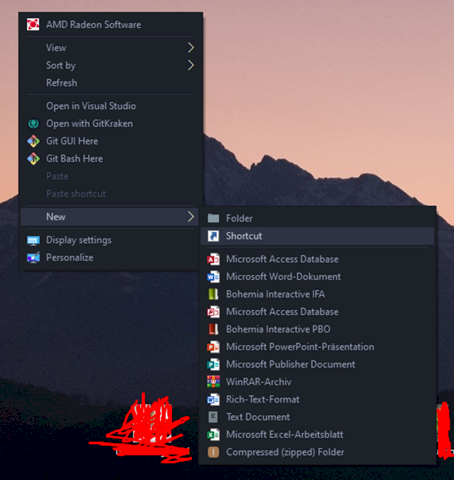
Right click, then New, and then click Link. Then simply select the application.
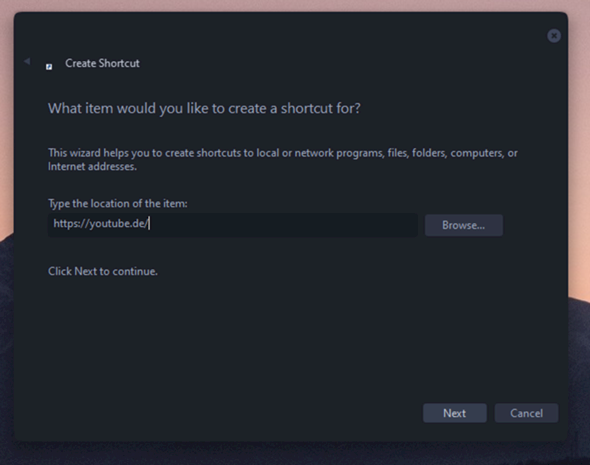
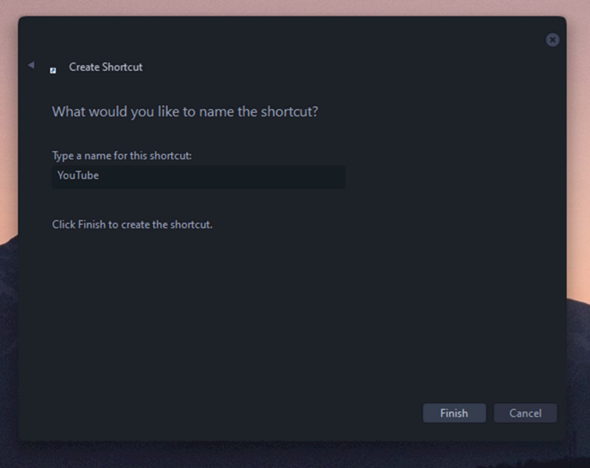
Simply create a shortcut on YouTube on your browser.
You're talking about tablet mode. It makes little sense on PCs and notebooks, here it is still important to run the program with duplicate. The most useful way to continue watching YouTube is in the browser.
You can create Internet shortcuts on the desktop.
You can of course also set bookmarks in your browser by opening the corresponding website and pressing the star or the heart at the top right, depending on what your browser has as an icon for it.
For Whatsapp you can download Whatsapp.
https://www.whatsapp.com/.../download/
You can save other programs that you have installed as a shortcut on your desktop. Most of the time, however, these are created automatically.


