How do I install d3xdx9_27.dll on the laptop?
I'm not checking what that is and how to install it.
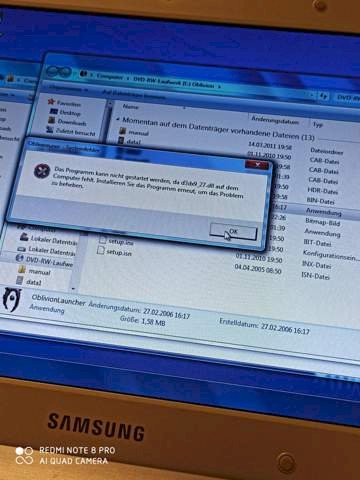
The file belongs to DirectX.
Have a look at Microsoft. You should be helped there.
The others have already written the answer, so now I only quickly notice that there are no more security updates for Win7 and you should urgently upgrade to Win10
It's best to reinstall the program, otherwise you can try to copy this file from the DVD to the installation folder.
If this is not possible and a new installation does not work, you can download and install the latest version of Direct X.
This could be a library from DX9, i.e. DirectX9. You obviously use Windows 7. This brought DX10 / 11 with it, but some DX9 libraries are missing. Install the latest DX9 update. Download the latest DX9 update, e.g. Down here:
Do not know the game itself, but the right DirectX 9.0c file is missing here.
Games of this generation usually provide the MINDEST-required runtime package (recognizable by "DXSETUP" or similar).
First search there, there's nothing to find try here:
I did now the error message oblivion does not work anymore when starting the game…
"… Download and install the latest version of Direct X."
Despite the most recent version, files for DirectX9 are missing.
As of DirectX10, backward compatibility is not guaranteed and therefore
it hooks between X9 & X10. Older games usually offer A post installation with.
If Oblivian does not work now, try the compatibility mode. Right click on the installed game and select properties. Then switch to compatibility and select compatibility with an older version of Windows. Can help with older programs.
I just added a comment to my answer and pointed out the compatibility mode. Maybe that will help Oblivian start again after the problem with the DX9 library has apparently been resolved.
However, some games do not run under Win 10 …
What did you do? Reinstall Oblivion or install the new DX version.
I know yes. The one with the latest Direct X version was meant as an alternative if for whatever reason the DX version didn't work in the game. It may help but it doesn't have to be.
That is why it is at the top that he should reinstall the game. Direct X should normally be installed there.
If not, you can see if you can still find DX9 as a download on the Internet.
Oblivion also runs without a compatibility mode.
VM
Was just a well-intentioned tip, because the compatibility mode can sometimes help. I don't play this game myself.
It has nothing to do with a VM…
BUT! You can run Win7 or another operating system in a VM


