Write the sign for Ohm or Omega, but how?
Wi
WineMosquito
4
I already searched for Google, but did not really find it. Windows 10 is running on my laptop.
po
postbox
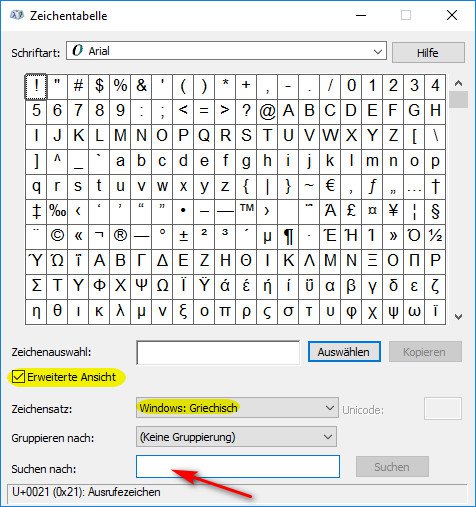
Enter a character table at the bottom of the Windows search bar to open it. If you still set the "Advanced View" check below and set the character set to "Greek", you can search for "Omega" or choose something directly.
El
Elsie26
Precisely because nobody knows, or finds, the ohms character is generally replaced with R… K is used if 3 zeros are to be placed at the back…
Then it just means 1R0, 5R6, 100K, 5K6 or whatever you want to write…
Read datasheets, there it will be handled…
Wi
WineMosquito
Have now found a solution. Take a waterproof edding and paint the sign on the screen.
El
Elsie26
Great as well


