Why is the external hard drive not shown but it is recognized?
When I connect my external hard drive to my computer at work, everything is recognized and I can access the hard drive.
BUT when I connect the hard drive to my private laptop, the hard drive lights up and the laptop makes the noise when a USB storage medium is connected, but I can't see the hard drive under "this pc" and I can't access it. Sometimes even my laptop hangs when I connect it. It always runs smoothly at work. Why is that and what can I do about it?
I assume that you are just not aware that Explorer does not show hard disks but only drives (volumes).
Hard disks or SSDs are of course only displayed in the disk management and in the device manager.
You probably haven't created a volume, just right-click on the Windows menu at the bottom left,
then go to Disk Management
and create a partition or volume
😄 😄 If the hard drive on another computer obviously also appears in what used to be the workplace, then it appears to have a partition and formatting.
Oh it was used before ^^
Is this hard drive only powered by the USB cable or is it one with a separate power supply?
There may be a possibility that the power supply of your computer's USB port is insufficient. Or the USB port itself has some problem. Because it is not normal that the computer then stops or hangs.
Another question would be how big is the hard drive and which operating system is yours?
In disk management, no hard disks in the sense are displayed, but rather disks and their partitions.
But in the end it's just stealing words and you know that yourself.
Incidentally, you are certainly not aware that there's automatic grouping in the workplace / computer / my computer with the group name hard drives, the number in brackets behind it indicates the number of hard drives!
So if Microsoft calls it hard drives, you can probably call it that.
Yes, it says that she goes to the work computer.
A hard drive is a data carrier.
The difference between disk, partition and drive / volume is not, as you say, word-stealing, but rather a necessary distinction in the type of problems the questioner has.
And while I'm counting on the peas: The term "workplace" no longer exists in current versions of Windows.
That means "This PC" and underneath it shows drives - no hard drives. (Which was also the case when it was called "Workplace".)
And there's clearly "Devices and drives". "Devices" in the sense of optical data carriers and disk drives. A hard drive without a drive will not appear there.
Of course, after win xp it is no longer called a workplace. And yet it said HARD DISKS and nothing else!
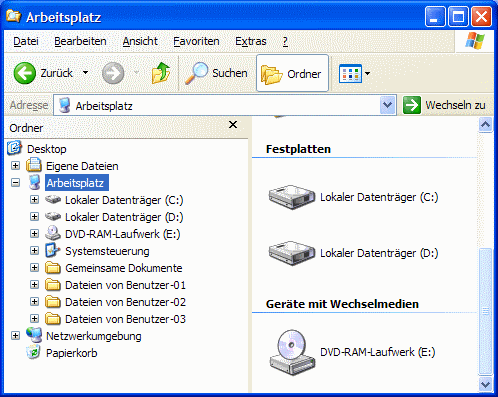
And to further annoy you, under Windows7 it is still called HARD DISK and nothing else!
Thank god nobody denied that there's a difference between partitions and data carriers. But it is stupid when a user in his workplace / computer / my computer refers to the connected hardware as a hard disk and another insists on calling it a drive.
If you take it exactly, you can no longer call an SSD a drive because technically nothing works.
Oh yes, which version of Windows is used here is not described anywhere.


