Microphone where to plug in (Iukus PC microphone)?
Net.
I just ordered a microphone and it arrived today. But I don't know where to plug it in or what to do to make it work. So far it didn't work.
What could be the problem?
You have to see if there are several connections for jack cables on your PC, one of which is labeled with something like "mic in". Most of the time the connector is pink or red.
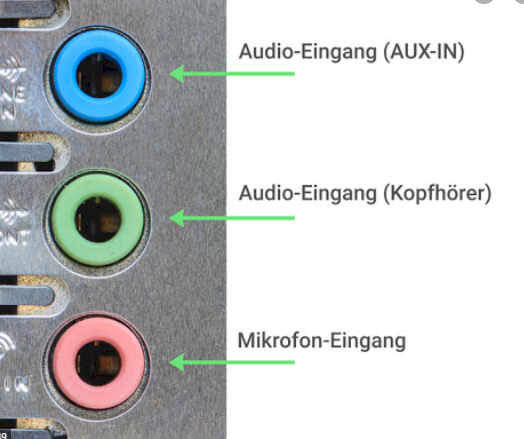
If you don't have one, send the microphone back and buy one with a USB port. This is usually more practical.
I did that. But unfortunately nothing can be found in the sound settings.
Is there nothing in the sound settings for microphone or just can't find the name Iukus? The microphone input should be listed under the name of the sound card or sound chip. Possibly. You will also need to download updated drivers for your sound card in order for it to be recognized.
Can you please explain how to do it
I see microphone once
Stereo mix
Otherwise I don't see anything. I tried both but unfortunately still no sound.
I just updated all of the drivers.
Then the microphone should be the right one. The sound from the microphone is not output through the loudspeakers, but there's a bar under the microphone setting field that says "Test microphone". There you can see if the computer gets a signal from the microphone. If you make noise, the bar should fill up.
Otherwise update device drivers. This is usually done automatically via Windows updates. You can also find out what the sound card is called in the device manager and then look directly on the manufacturer's website to see if you can find newer drivers for it.
So:
Open the device manager (just search for "device manager" in the start menu)
Open the area "Audio, Video and Game Controllers"
Googling for the devices and see if you can find drivers
Download driver
Open the downloaded file to install the drivers.
Can you look for it Would be really nice and you would have deserved praise!
It's called the microphone (Realtek High Definition Audio). Would be really nice of you.
The best I could find on the fly is this:
https://www.realtek.com/en/agree-to-download?downloadid=8e3c8982d0134ce0c7910ef7f421bd7f
Insert the jack plug on the back of the PC into the socket marked pink.
The sockets on the front of the PC are usually not color-coded. - Then you have to try.
Then proceed as follows: Right-click on the white loudspeaker symbol in the system tray> Sounds> Record. - The microphone should be displayed here. - See picture example:
Then go to Settings> Privacy> left: Microphone and enable the apps that are allowed or should access the microphone. - See picture example


