WLAN works with the mobile phone but not with the notebook?
Hello everyone, :)
I have the WLR.360-wps in operation as a router. The WLAN works on my cell phone, but on my notebook (Winows 10) I get the message "No connection to this network possible" before I can even type in the password to the router.
Can someone help me please?
This is a repeater not a router.
Use the simple registration method:
"Secure connection at the push of a button: press the WPS button on the repeater and PC - done!"
Also sure that the cell phone gets Wi-Fi from the WLR.360?
While it's a ready-made answer (mention it because I've been jostled about it), it should help:
Answer from 10.12.2017 21:16 by HerbyDu to article https://www.7links.me/300mbps-WiFi-Repeate-GRA-34206-919.shtml
7left Wi-Fi repeater WLR.360-wps
I set up the repeater as described (often and in between resetted), but as it says in the description: "If you now position the repeater in the middle between the WLAN router and your computer (or another WLAN device), you should No longer connect your computer (or the other device) to the router, but to the repeater "- that just doesn't apply. The notebook recognizes the network ext and shows the best signal, but can't connect to it.
Answer from 12/11/2017 12:43 from 7links Service to article https://www.7links.me/300mbps-WiFi-Repeate-GRA-34206-919.shtml
7left Wi-Fi repeater WLR.360-wps
Please connect your PC / laptop manually to the repeater. An automatic connection is not established the first time.
Answer from 01/11/2018 10:16 PM by HerbyDu for article https://www.7links.me/300mbps-WiFi-Repeate-GRA-34206-919.shtml
7left Wi-Fi repeater WLR.360-wps
After several attempts, a connection via the repeater is finally possible, but there's the following problem: The connection to the Internet (router) of the notebook or cell phone is weak without a repeater, excellent with a repeater. Practical application is better without a repeater. I.e. Despite a very good connection, it only loads very slowly via the repeater, a YouTube movie is e.g. Not possible to look at.
Answer from 01/12/2018 12:04 PM from 7links Service to article https://www.7links.me/300mbps-WiFi-Repeate-GRA-34206-919.shtml
7left Wi-Fi repeater WLR.360-wps
Please make sure that the reception between router and repeater is also good. It is advisable to operate the repeater in a place where both the router and the laptop can be easily reached.
Which setting on the repeater "Repeater" or "Client"?
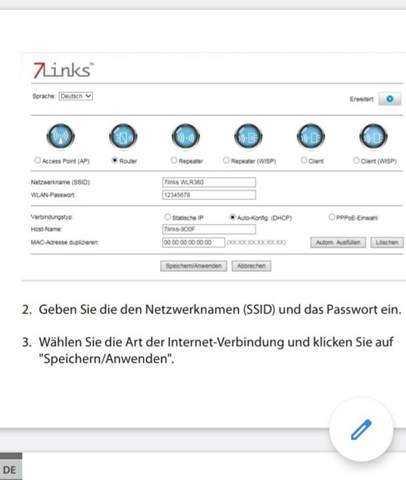
It is the "Router" setting. Unfortunately I can't send a picture to your question. I added one to my question later. -I hope it will still be displayed.
First of all, thank you for taking the trouble to quote all of this.
Yes, I'm sure that the WLAN comes from the WLR.360. I have no other device from which it can come. It is only the WLR.360 which receives the LAN signal from the "wall socket" and my cell phone with which I use the WLAN. -Works perfectly with the mobile phone only my notebook shows the error message mentioned in my question above before I can even enter the password.
"It is only the WLR.360 that gets the LAN signal from the" wall socket ", this sentence irritates me a little. What does "wall box" mean? Is it a network socket inside the apartment?
So, I downloaded and read the user manual. So with "router" the WLR must be connected to the router by cable and then you can use the WLR from the WLR. As stated in the manual.
If there's a router in the apartment, you should select "Repeater", which serves to enlarge the radio range. Setting is described from page 25.
Now you will also be able to access the Internet with your laptop via Wi-Fi.
You know how?


