Connect laptop and PC?
I want to connect my PC to my laptop (so I can use the keyboard and the screen) and I wanted to ask which cable I need and whether you know a YouTube video.
I don't quite understand.
you have a pc and a laptop. And should both go through the same monitor and the same keyboard?
No problem with the monitor. To do this, the monitor only has to support n additional cables and the laptop the same. Which one has to look for yourself. With luck it's a hdmi cable, but it can also be vga or dvi (or display port) … Depending on the age.
the keyboard… How is it connected? Wireless? It will be difficult, since the receiver must always reposition. Bluetooth could work, depending on the keyboard. Some can operate multiple devices and you can then select the device using the function key. A cable splitter could be used with a splitter. At least I used to have it with ps2, usb I'm not sure right now… Otherwise you just have to reposition.
That does not work. A direct connection between two computers is only possible via a network, or also with a "cross-over" network cable for direct connection to the LAN port. However, this is only for data transmission.
at most, you can connect your monitor to the laptop, which is common for laptops. But if you want to use a different keyboard, you can only use an external one via usb.
You probably mean remote control?
You can connect both computers to the router, then you are in the same network.
Then you install the TeamViewer software on both computers and you can dial in either way, as required.
You have the other one practically in a window and work on it as if you were sitting in front of it.
https://www.heise.de/...ewer-32757
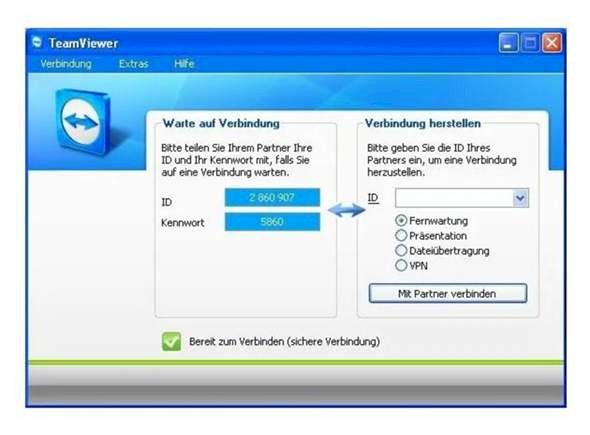
But how do I do this on the PC? I don't have a screen for it so I don't know what ID it has?
No, I don't have an external monitor or keyboard. That's why I want to connect the PC to my laptop for the time being so that I have a screen and a keyboard.
You set it up once and then leave it on dial-up.
When starting up, you will automatically go to teamviewer. So you can always dial in, even if you had switched it off.
It will not be so easy.
So connecting the hardware does not work. Neither from the monitor nor from the keyboard.
what is possible that you do remote maintenance all the way. Remote desktop would probably be worth a try since all others (vnc, teamviewer) have to be installed separately.
however, the pc should be in the network (if necessary via cable) and you should know the ip (e.g. From the Fritz box)


