Windows 7 upgrade advisor could not get compatibility information?
Would be great if someone can help me.
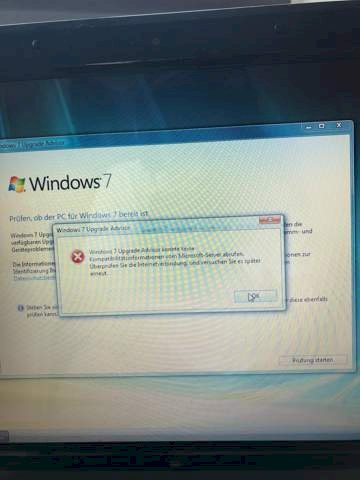
Yesterday I wanted to load Windows 7 on the old Vista 32bit laptop, then I simply wanted to use the Upgrade Advisor to see if the Lap could do it. Then got the message (see picture) so I thought because the box is already very old I reset it to the factory settings. So everything rebooted via BIOS.
Same game, got the advisor again and again the stupid error message about no internet connection? But I have one!
Does anyone know if you can get Windows 7 on it even if the advisor doesn't work?
Are there installation codes for Windows 7 to buy online?
Thanks in advance for your help!
You can also install Windows 10 right away.
I tried it on an older PC with 3GB. Win7 went - to my astonishment, Win10 was significantly faster than Win7.
The advisor will no longer work because WIN7 is no longer supported. Experience shows, however, where a Vista is running, a 7 is also running. But what for? WIN7 is not supported any more than Vista. Both yesterday's snow. You can switch to WIN10 right away… ☻☻☻
The following condition must be met for the "Upgrade Advisor" to work.
Supported operating system
Windows 7; Windows Vista; Windows XP Service Pack 2
.NET Framework 2.0 or higher when running in Windows XP
I wouldn't take an old Vista laptop because it supports Windows 7, Windows XP and Windows XP drivers and most of the time the drivers for the laptop were never made for Windows 10. But it depends on the laptop.
Please check which ".NET Framework" version is installed on your PC.
Funny, can you go straight from Vista to 10? Are there any upgrade codes online?
However, there may be a problem with a laptop that the drivers do not support Windows 10, so first check the manufacturer's website to see if there are any for Windows 10. In addition, the Windows 7 Windows XP and Windows Vista driver supports what Windows 8 / 8.1 / 10 does not do
Hasn't Windows 7 still had updates until now?
Do not have XP but Vista, do you need at least a Net Framework?
Until January 14th, 2020 …
Ah ok, well that's still possible 😄
Thanks👍🏼
This is most likely because Microsoft has ended support for Windows 7. However, you can still install it as long as you have a Windows 7 ISO or CD. If you have a CD, insert it and switch off the laptop and press the F key that calls up the boot menu. If you have an ISO you can create a boot stick for this but you need a USB that has 4gb or more and on which there are no important files. If you don't know how to do this or which F key you should press, you just have to tell me which laptop you have and because of the boot stick I can send you a tutorial.
So to speak, yes. Even though Microsoft says the opposite, I still have regular updates. Even today I got some.
Correct, but no longer for Windows itself, but for the security essentials, e.g. For MS Office. I still have two boxes with the 7 running…
You need Net Framework version 2.0. If Windows XP on the PC is 2.0 or higher. What's not to understand there?
Not understandable at first, because one could have understood it differently. You can also read it like this: for Windows XP you need 2.0 or higher. Now I got it.
Now it's my turn to update Vista Service Pack 2.
Thank you, the topic is done by habs with the iso file.


