Second hard drive in Asus Notebook?
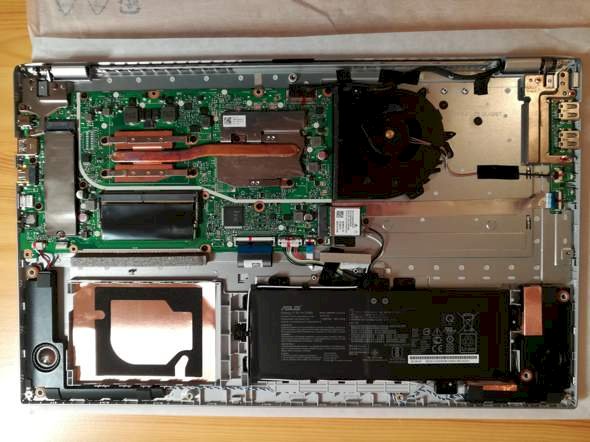
Can someone say from the photo if I can somehow install a second hard drive here?
At the bottom left there's at least space for this. The SSD hard drive is probably at the top left under the gray elongated cover. I don't see any other hard drive connection.
What does the instruction manual say?
So there's space, but the connections seem to feel on the mainboard.
In this respect, I would almost say that another hard drive is not planned.
The decisive factor is whether there's a SATA connection, which can't be clearly seen in the picture, but looks more like it is not.
Yes.
Did you already describe.
An M.2 fits on the top left.
And a SATA in the lower left.
With the M.2 you have to look in the manual to see what the notebook can do. NVMe (PCIe) or SATA. It says exactly where something can go. Manual is always good.
You can install a SATA SSD or a SATA HDD below. If the connection is there. Manual!
Thank you for your answers. The manual says nothing at all, because these are just two pages that show how to connect the power cord.
Unfortunately, I can't find any instructions, not even on the Internet
Unfortunately I have no idea where the manual should come from. What is online from the manufacturer does not go into so much detail. Nowhere was I able to find out what motherboard is installed there.
It would be helpful to call the laptop model directly if you have a question.
It is the ASUS VIVOBOOK 17 (M712DA-AU123T)
So a laptop that only came on the market this year and you still have a guarantee for it, will you first screw it apart? Yes, if you're unlucky, the guarantee is now gone.
Back to question again… Since the device is also available with a pre-installed hard drive, it has to be connected somehow.
I would have looked around and saved myself the question, and would have simply contacted the support.
They will probably be able to tell you how to connect a hard drive.
Thanks for looking, but does it always have to be associated with stupid accusations?
What allegations? I found that opening the device within the warranty was not particularly intelligent.
Homepage manufacturer (Asus), search for the Vivobook with the exact name and read the specifications.


