Suddenly laptop can no longer connect to Wi-Fi?
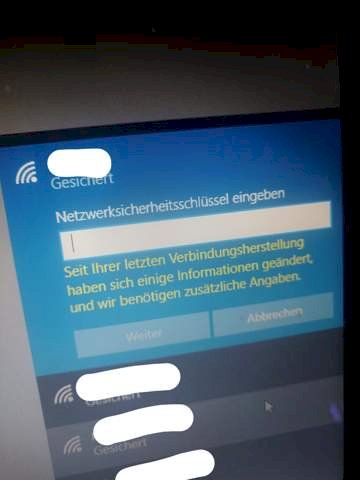
Hi my problem is this: I'm always normal with our laptop in our WLAN at home. Sometimes, however, he suddenly leaves the WLAN. When I try to connect again I get the error message "Some information has changed since your last connection and we need additional information", and I'm asked to enter the password. When I do that, it just shows me that it would be wrong (which it definitely wasn't). After a few minutes, sometimes hours, it reconnects normally after a restart. I searched the internet and saw that other people also have the problem, but found no solution.
OS is Windows 10, network adapter has the latest drivers, remove from known networks, reset network etc. Does not work. Nor can I find the problem with the router (especially since the Wi-Fi works normally on all devices in the household. Vlt one of you has a solution.
Did you restart the Lappy and or the router?
Reset laptop with and without network reset and also the router: /
Yes haste
There are not many options, either to update the drivers on the laptop, to update the firmware on the router - or, if nothing works… Set up the router again. So reset to factory settings… If it is because of the router
Are you sure that the network is not a fake access point that only wants you to enter your data?
No, that's our private network…
It works like random whether it helps what or not sometimes after a restart, sometimes after 3 not…
It can have the same name SSID as your own. You can even create it with your cell phone. If the signal is stronger or closer than your router, the PC connects or whatever then via this access point.
The message you wrote there doesn't exist in Windows.
Can you post the time as a photo?
Whenever something extraordinary happens, I advise you to download the ADWCLEANER from "Heise.de" and allow it to go through.
Most of the time it is a "potentially unwanted program", in short "PuP" - in the strict sense not a virus, but a program that only wants to annoy - the common thing is that viruses can open the door to your PC.
After the run, please run the CCleaner with caution and check what is deleted so that all residues are deleted.
Click Settings - Network and Internet - WLAN - Manage WLAN settings - Manage known networks A list with the WLAN profiles appears. Click Profile and then Don't Save to delete the profile.
-Afterwards reconnected to the WLAN network
I've done that many times
I know what you mean but think it's unlikely that has been going on for weeks. I also checked very carefully what I connect with. I have Windows 10
I requested to add a picture to the question


