Automate process in Windows 10?
At my workplace, I have to constantly re-register in the WLAN if I have left the network for a short time or my notebook was in standby or something similar. Then are always the same 5-6 clicks necessary?
Is it possible to program a sequence that automatically performs these steps when it is triggered? Is there a software or is it even with board means?
When you connect to the Wi-Fi, put the "Auto Login" hack.
That should work then!
That would be the normal user path +1
That would be solved very quickly with a simple powershell script. If it is your work PC, I would still ask for support. In any larger company, the models should be similar and then the error is known. Often the support has long since a common workaround for it.
It is a school. No one knows anything about this. And of course I bought my work PC myself.
Unfortunately that does not bring anything for the registration at the hotspot server…
Achso, did not mention that with the hotspot. This is due to the provider of the hotspot. Automatically connect to the Wi-Fi is, but the registration on the Hotspotseite you can't influence…
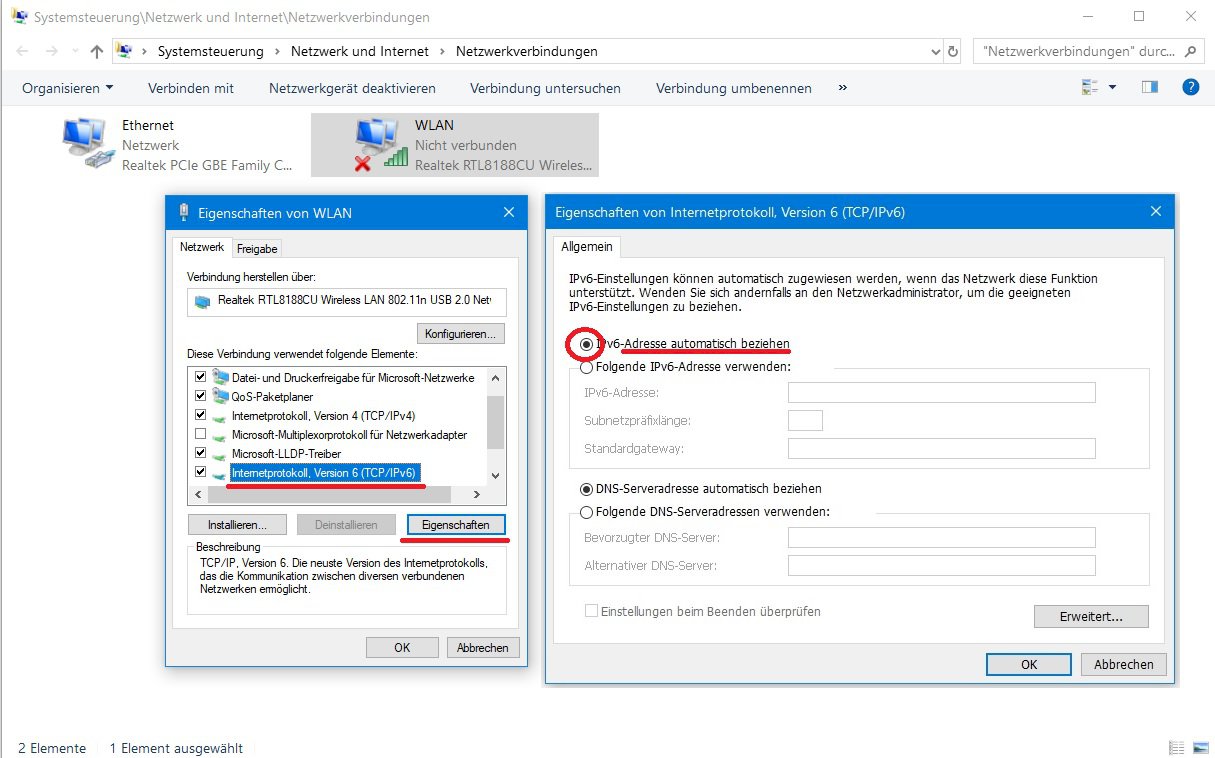
Go to Settings> Network and Internet> Change adapter options> Right-click on the WLAN adapter> Properties> check "Internet Protocol Version 6"> Properties> check if "Obtain IPv6 address automatically" is activated.
This also with "DNS server address automatically referenced".
The same thing for "Internet Protocol Version 4"